EdTech · Product Design · UX/UI
Kinetic Academy
Making collaboration a skill students can actually practice.
Kinetic Academy is a collaborative learning platform designed to help students develop teamwork, communication, leadership and accountability through structured project-based learning.
An independent case study designed end-to-end, from research to a working prototype.
- Role
- Product Designer
- Discipline
- UX Research · UX/UI · Product Design
- Platform
- Web / LMS
- Audience
- Students 8–12 · Teachers
- Status
- Prototype
01 Discover
What is happening?
02 Define
Why is it happening?
03 Develop
What system could address it?
04 Deliver
What did I design, and how would I validate it?
In short
- 01
What I did
Designed a project-based learning platform end-to-end — desk research, PESTEL, exploratory interviews, IA, three product flows and a prototype.
- 02
What changed
Collaboration became visible while the project is still live: staged roles, transparent task allocation and a teacher fairness check.
- 03
What I'd test next
Whether visible contribution actually balances participation, in a classroom pilot with students and teachers.
This is an independent case study I designed to practice end-to-end product thinking — from research through to a working prototype.
View interactive prototype01 — Discover
What is actually happening in a school group project?
Kinetic Academy is an education product built around structured project-based learning, starting with Indian schools and students in grades 8–12.
Context
The output is visible. The process isn't.
The problem is not that students complete group projects. The deeper problem is that project-based learning usually makes the final output visible while the collaborative process behind it stays difficult to observe.
- Students may contribute unevenly.
- Leadership opportunities may not be distributed.
- Responsibilities can be unclear.
- Teachers may primarily see the final output rather than the collaborative process.
The problem
Group projects are common. Structured collaboration isn't.
Students are expected to know how to work in teams before they have had meaningful opportunities to practice teamwork, communication and leadership.
Traditional group work makes contribution difficult to see. One student takes over. Another contributes very little. A third never gets an opportunity to lead.
Meanwhile, teachers are expected to evaluate the final outcome without being able to observe the collaborative process that produced it.
- Friendship-based team formation
- Unequal participation
- Unclear responsibilities
- One student doing most of the work
- Students disappearing from the process
- Limited leadership opportunities
- Poor visibility into individual contribution
- Teacher difficulty monitoring collaboration
- Assessment focused on the final output
How might we help schools turn group projects into structured learning experiences where every student has meaningful responsibility, receives feedback, and develops collaboration and leadership skills?
Current system
How the traditional model works today
A linear path from teacher to grade — with everything that happens between the assignment and the submission left unrecorded.
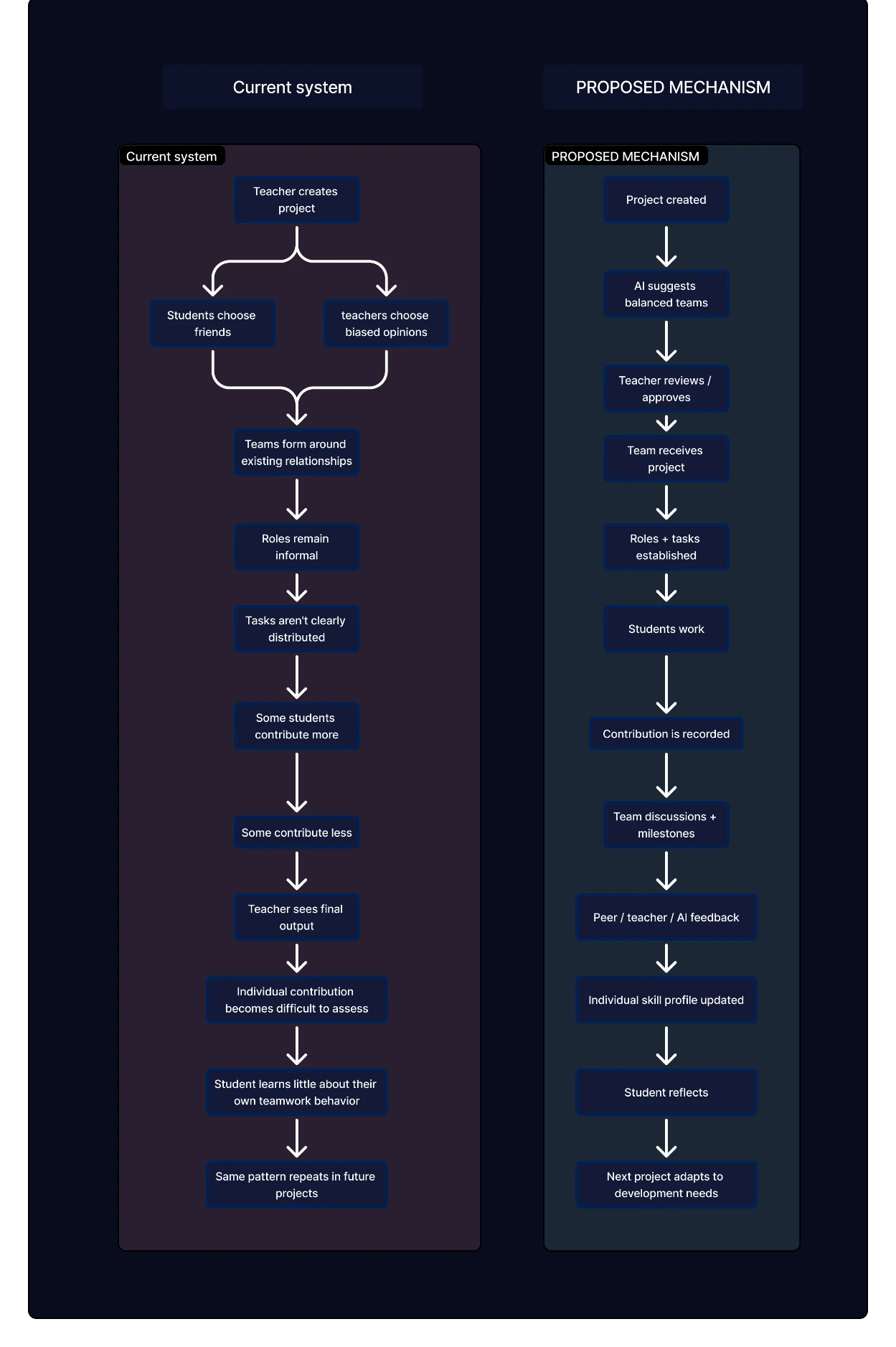
Current system vs proposed mechanism
What remains invisible
Affinity themes and secondary research both point at the same gap: the system records the submission, not the collaboration that produced it.
- Individual contribution
- Leadership
- Communication
- Accountability
- Who struggled
- Who supported others
- Who completed tasks
- How collaboration developed
Research
How I investigated the problem
Desk and secondary research framed the problem; exploratory interviews with students and teachers grounded it in lived experience. Anything not yet conducted is labelled as still to validate.
Desk research
- Education and employability research
- Collaborative learning research
- Project-based learning
- Teamwork and leadership development
- LMS and assessment models
Exploratory interviews
- College peers / students
- Teachers from my college
- Teachers from my school
- Teachers from another school through my family network
Qualitative research
- Public discussion threads (Reddit)
- AnswerThePublic query patterns
- Exploratory interviews with students and teachers
Quantitative research
- Student survey
- Teacher survey
- Participation measurement
Market / context
- Indian education context
- Grades 8–12 project culture
- Existing approaches and their gaps
PESTEL
- Political
- Economic
- Social
- Technological
- Environmental
- Legal
Accessibility / WCAG
- Contrast and legibility
- Readable language for ages 13–18
- Keyboard and screen-reader considerations
- ✓Desk / secondary researchConducted
- ✓Exploratory interviewsConducted
- ○Quantitative surveyTo validate
- ○Usability testingTo validate
Exploratory interviews
Exploratory Interviews
Before validating the concept at scale, I spoke with students and teachers to understand how group projects are actually experienced.
Who I spoke to
- College peers / students
- Teachers from my college
- Teachers from my school
- Teachers from another school through my family network
Exploratory conversations across students and teachers helped surface recurring patterns around team formation, participation, accountability and assessment. These were not statistically representative and are not presented as measured findings.
What students shared
Team projects expose problems later
Students described that many collaboration problems become far more apparent in college, when projects get larger and more complex — dividing responsibilities, communicating with teammates, coordinating deadlines, handling disagreements and understanding how to contribute effectively.
School projects can provide an earlier opportunity
Participants felt that introducing structured collaboration earlier could help them understand how teamwork actually works before it becomes a major requirement. The insight is not that students cannot collaborate — it is that they may not get enough structured opportunities to practice it.
Internal marks can affect group dynamics
Some students described group projects being tied to internal assessment, which can create pressure around contribution and participation. This was described in specific contexts rather than as something that happens everywhere.
What teachers shared
Limited time to monitor collaboration
Teachers explained that they often do not have enough time to closely observe every student's contribution while balancing teaching, curriculum requirements, classroom management, assessment and administrative work.
Structured support could help
Teachers felt a more structured project workflow could make teamwork easier for students while reducing manual coordination — not adding work, but making collaboration structured enough to support without managing every step.
Assessment should remain simple
Teachers highlighted that understanding participation and development should not require another complicated assessment process — structured task ownership, visible contribution, concise summaries and AI-supported evidence rather than inspecting every conversation.
Synthesis
What I took from the conversations
Insight 01
Students need earlier practice with collaboration.
Teamwork becomes increasingly important as projects become more complex, but students may not have enough structured opportunities to practice it beforehand.
Insight 02
Teachers cannot manually observe everything.
Teachers need visibility into contribution without having to monitor every task and conversation.
Insight 03
Structure can reduce coordination overhead.
Clear roles, tasks and deadlines can make team projects easier to manage for both students and teachers.
Insight 04
Assessment should capture the process without becoming another burden.
Teachers need concise evidence of what happened during the project rather than another complex grading workflow.
Where project work sits historically
Where it starts
Initial market: Indian schools. Primary segment: grades 8–12 — the point where project work becomes routine and academic decisions carry more weight.
- — Projects and presentations become routine
- — Extracurricular activity increases
- — Competitions enter the calendar
- — Career exploration begins
- — Academic decisions carry higher stakes
PESTEL
Political+
NEP 2020 emphasises holistic development, 21st-century skills, experiential learning, competency-based assessment and technology-supported education.
Economic+
Schools need measurable outcomes while teacher workload stays a hard constraint. Automation of administrative effort is the opening.
Social+
Students already form social groups. Friendship-based grouping reinforces existing structures; structured formation can widen collaboration.
Technological+
AI can support team formation, task recommendations, feedback and skill analysis — supporting teacher judgment, never silently deciding a student's ability.
Environmental+
Digital workflows reduce paper submissions and repetitive documentation. Not treated as a product claim, since it isn't measured.
Legal+
The product involves minors. Consent, data minimisation, student safety, access controls and responsible AI are treated as design constraints.
02 — Define
Why is it happening?
Synthesis, cause and effect, and five whys converge on a single structural gap — then that gap becomes a problem statement, a set of principles and a proposed mechanism.
Affinity mapping
Affinity Mapping
I grouped recurring themes from the exploratory interviews and earlier research to identify patterns across team formation, contribution, accountability, communication and assessment.
Team formation
Qualitative signal- — I always work with my friends.
- — I don't know people outside my group.
- — Teacher decides teams.
Synthesized observation
Contribution
Qualitative signal- — One person does everything.
- — Some people disappear.
- — Everyone gets the same grade.
Synthesized observation
Accountability
Hypothesis- — I didn't know what I was supposed to finish.
- — Deadlines weren't clear.
- — Nobody checked.
Synthesized observation
Communication
Qualitative signal- — We discuss everything on WhatsApp.
- — People don't respond.
- — Arguments happen.
Synthesized observation
Assessment
Secondary research- — Teacher only sees the final presentation.
- — Individual effort isn't visible.
Synthesized observation
Development
Hypothesis- — I don't know if I'm a good leader.
- — I don't know what I need to improve.
Synthesized observation
Cause & effect
Six forces producing the same outcome
Mapping the causes across people, process, technology, assessment, environment and culture.
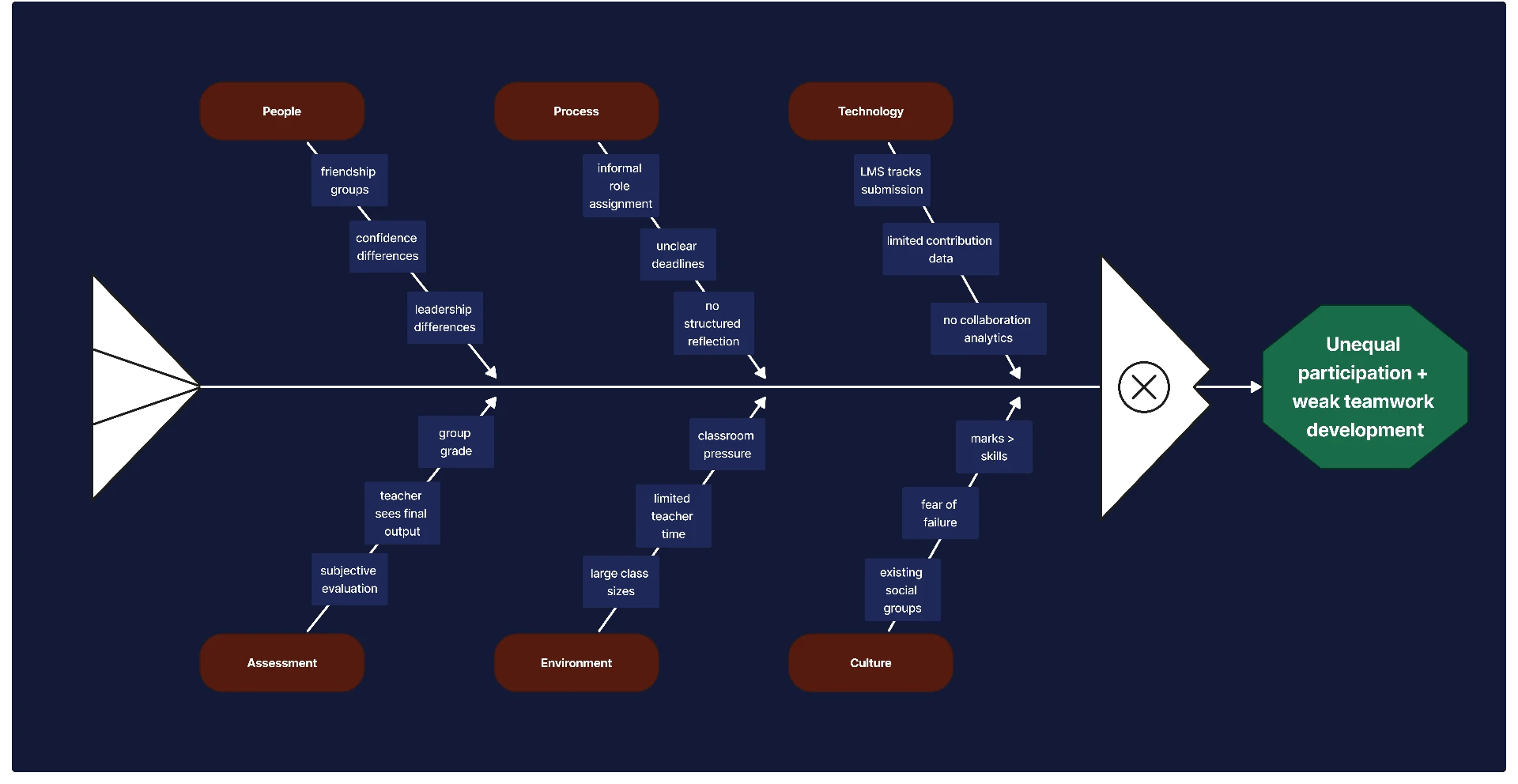
Cause & effect — unequal participation and weak teamwork development
People
- — Friendship groups
- — Confidence differences
- — Leadership differences
Process
- — Informal role assignment
- — Unclear deadlines
- — No structured reflection
Technology
- — LMS tracks submission
- — Limited contribution data
- — No collaboration analytics
Assessment
- — Teacher sees final output
- — Subjective evaluation
- — Group grade
Environment
- — Large class sizes
- — Limited teacher time
- — Classroom pressure
Culture
- — Existing social groups
- — Fear of failure
- — Marks over skills
Unequal participation + weak teamwork skill development
Root cause
Five whys
- 01
Why do some students contribute disproportionately?
Because team responsibilities aren't clearly distributed.
- 02
Why aren't responsibilities clearly distributed?
Because group projects focus on the final outcome rather than task ownership.
- 03
Why is the final outcome prioritised?
Because it is easier for teachers to assess.
- 04
Why is individual contribution difficult to assess?
Because existing LMS and assessment workflows don't capture the collaborative process.
- 05
Why doesn't the system capture the process?
Because LMS platforms are built around content → assignment → submission → grade, not practice → collaboration → contribution → reflection → competency.
The learning system lacks structured visibility into how students collaborate and develop transferable skills during project-based learning.
Who we're designing for
Three stakeholders, three sets of needs
Not a fictional persona — the actual parties whose needs the system has to hold at once.
Student
Grades 8–12
Needs
- — Clear responsibility
- — Understandable tasks
- — Opportunity to lead
- — Visibility into progress
- — Feedback on collaboration
- — Evidence of growth
Teacher
Classroom facilitator and assessor
Needs
- — Efficient team formation
- — Visibility into contribution
- — Ability to review final work
- — Ability to identify students who need support
- — Less administrative overhead
School
Institution and curriculum
Needs
- — Structured project-based learning
- — Evidence of transferable skills
- — Longitudinal student growth
- — Career readiness development
Design principles
Five principles the product has to hold
Every later decision is checked against these.
Everyone contributes
Every student receives meaningful responsibility inside each stage of the project.
Everyone leads
Leadership rotates between project stages instead of settling on one student.
Make collaboration visible
The system captures meaningful evidence of participation as work happens.
Support teachers, don't replace them
AI summarises evidence and surfaces inconsistencies. The teacher decides.
Turn feedback into growth
Students see not only what they did, but how they can improve next time.
Problem definition
What we are actually solving
Students need structured opportunities to practice collaboration and leadership, while teachers need a manageable way to understand contribution without monitoring every interaction.
How might we help schools turn group projects into structured learning experiences where every student has meaningful responsibility, receives feedback, and develops collaboration and leadership skills?
Proposed mechanism
Not another LMS — a more visible process
The mechanism replaces a three-step path to a group grade with a structured sequence that makes collaboration observable while it happens.
- 01Group assignment
- 02Shared output
- 03Group grade
- 01Balanced team formation
- 02Rotating stage leadership
- 03Shared responsibility
- 04Task ownership
- 05Visible collaboration
- 06AI-supported guidance
- 07Teacher review
- 08Feedback
- 09Skill growth
03 — Develop
What system could address it?
Structure, architecture, flow and design language — decided before any screen was drawn.
Structure
Three destinations, everything else contextual
Collaboration stays contextual to the current project and stage. Students don't need to navigate between separate chat, task and project systems — everything they need stays connected to the work they are doing.
Home
Your starting point for what's happening now.
- — Current mission
- — Project progress
- — Upcoming deadlines
- — Quick access to active work
Projects
Where team collaboration and project work happen.
- — Overview
- — Team Chart
- — My Tasks
- — Stage-specific chat
- — Task ownership & progress
Chat and tasks stay inside the project and current stage.
Feedback & Growth
Where project work becomes visible as learning and growth.
- — Teacher Review
- — AI Review
- — Your Activity
- — Achievements
- — Skills & Growth
- — Project history
Information architecture
Information Architecture
How the product is structured around the student's project journey.
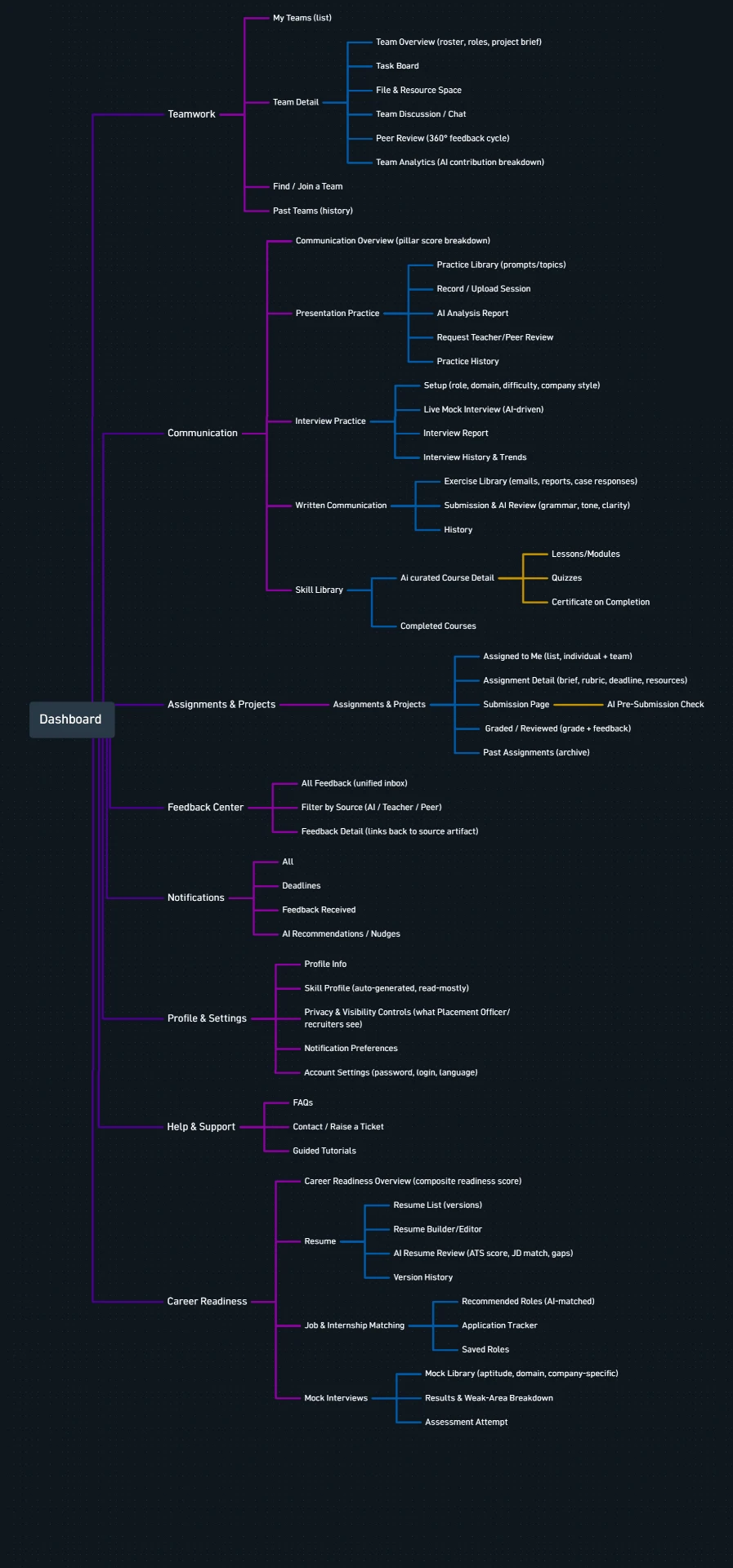
Information architecture
User flow
Student User Flow
From joining a team to completing a project and receiving feedback.
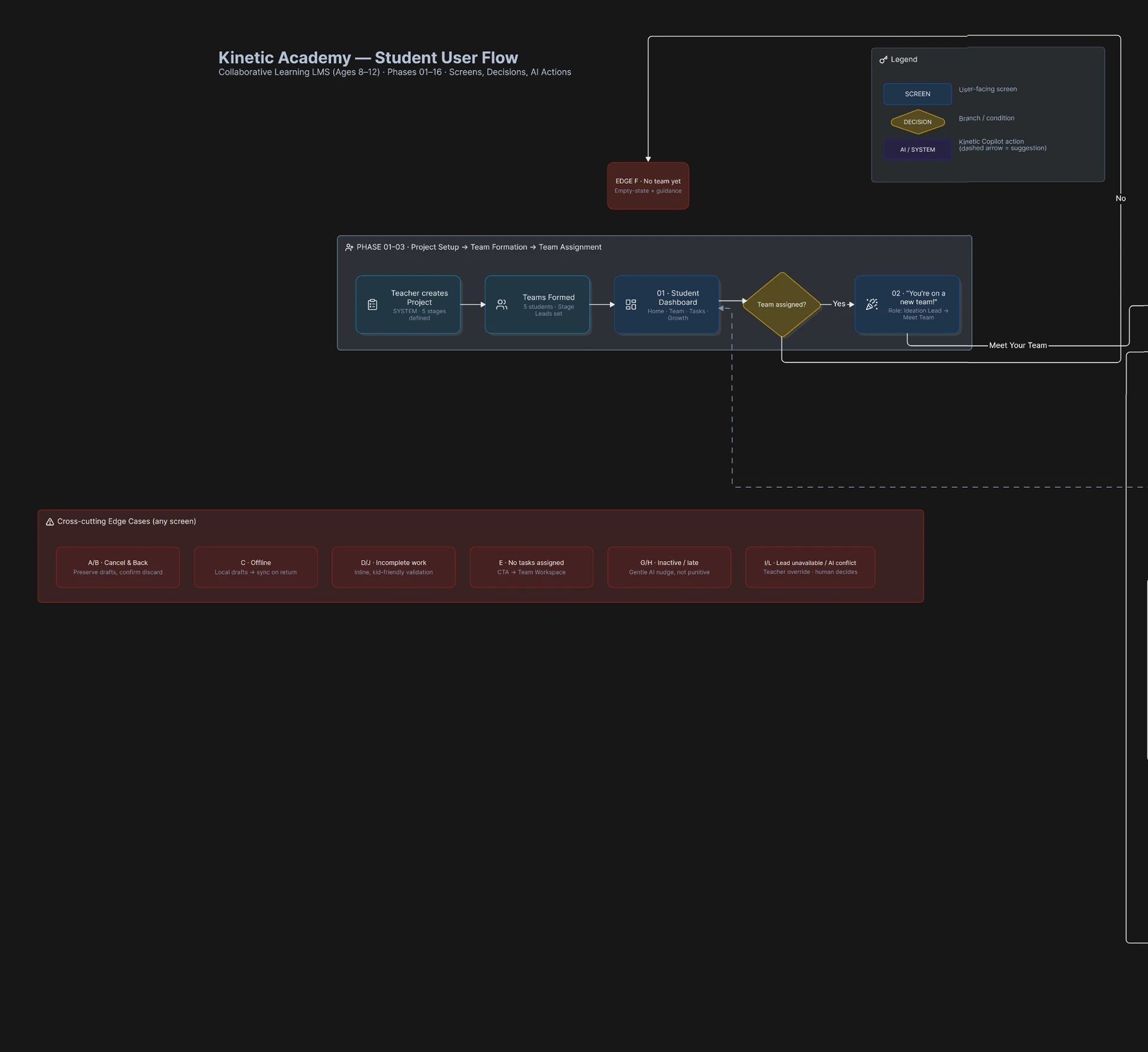
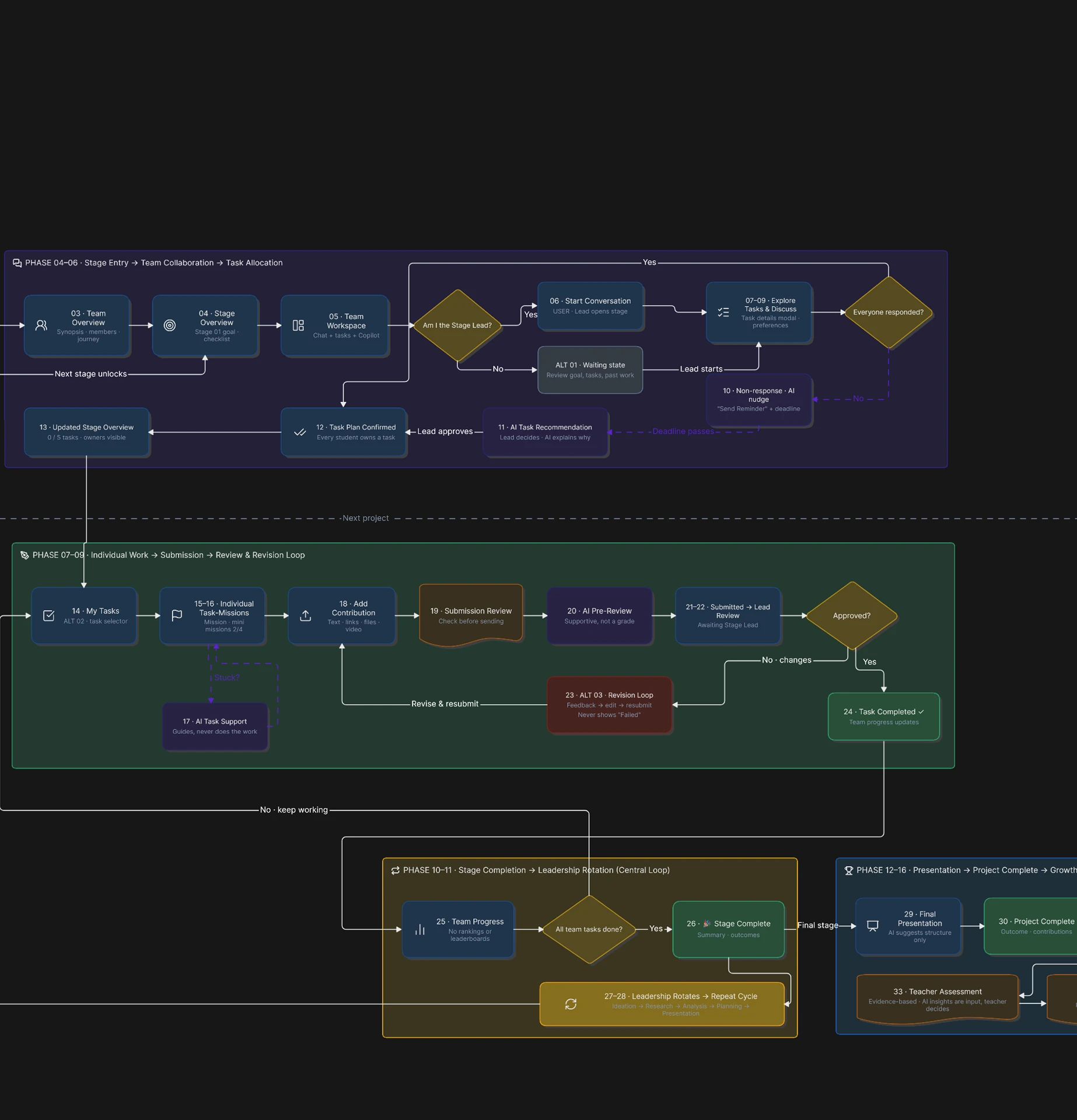
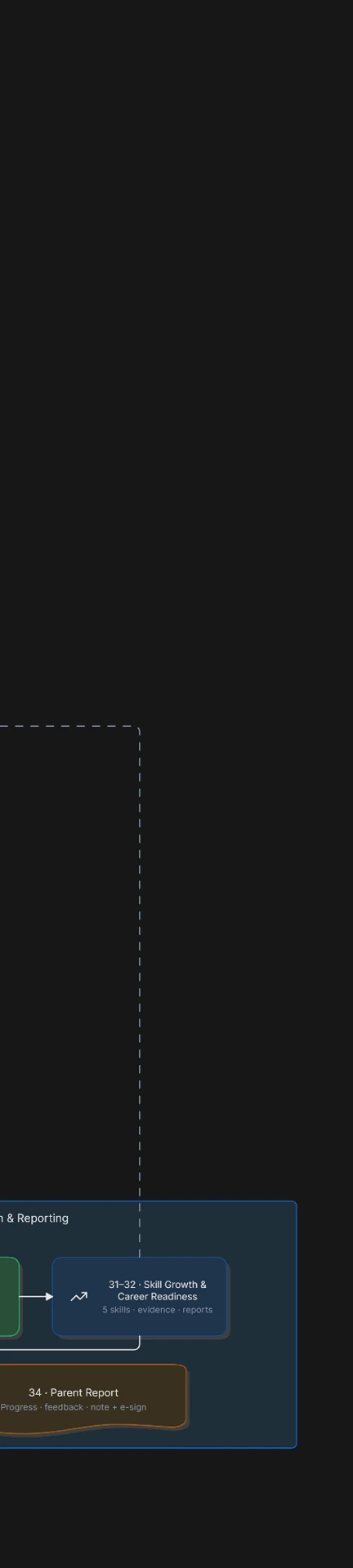
03 — Develop
Student Journey
From joining a team to completing a project and understanding how they grew.
After the project — Feedback & growth
Not assignment → submission → grade
System model
How the parts relate
Stages, leads, tasks and review connected into one loop.
Ideation
Alex — lead
Research
Maya — lead
Analysis
Jordan — lead
Planning
Ananya — lead
Presentation
Arjun — lead
Student
Owns tasks, participates in discussion, makes decisions with the team.
Team
The unit a project belongs to; formed by the teacher, not by friendship.
Tasks
One owner each, carrying deliverables, deadline and submission.
Stage lead
Rotates by stage, coordinating discussion and reviewing contribution.
Kinetic Copilot
Recommends allocation, nudges participation, surfaces patterns.
Teacher
Reviews the final work and holds the final academic judgment.
Feedback
Teacher review and AI observations returned to the student.
Skill growth
Collaboration evidence accumulated across projects over time.
AI recommends and identifies patterns. Students collaborate and make decisions. Teachers remain responsible for final academic evaluation. AI never silently replaces teacher judgment.
Wireframes
Screens ordered by the journey, not by screen type
The same eleven steps a student moves through, in the order they encounter them.
- 01Team assignment
- 02Team overview
- 03Stage overview
- 04Team discussion
- 05Task allocation
- 06Task overview
- 07Individual task
- 08Task submission
- 09Stage completion
- 10Final presentation
- 11Feedback & Growth
Design system
A language for two very different readers
The visual language needed to balance playfulness for students with clarity for teachers.
Typeface
Quicksand
Color
Primary
#3B82F6
Secondary
#10B981
Tertiary
#F59E0B
Neutral
#F8FAFC
Foundation
Google Material-inspired component principles.
Documented
- Typography
- Color
- Buttons
- Cards
- Inputs
- Navigation
- Progress
- Metrics
- Feedback
- Achievements
- Accessibility
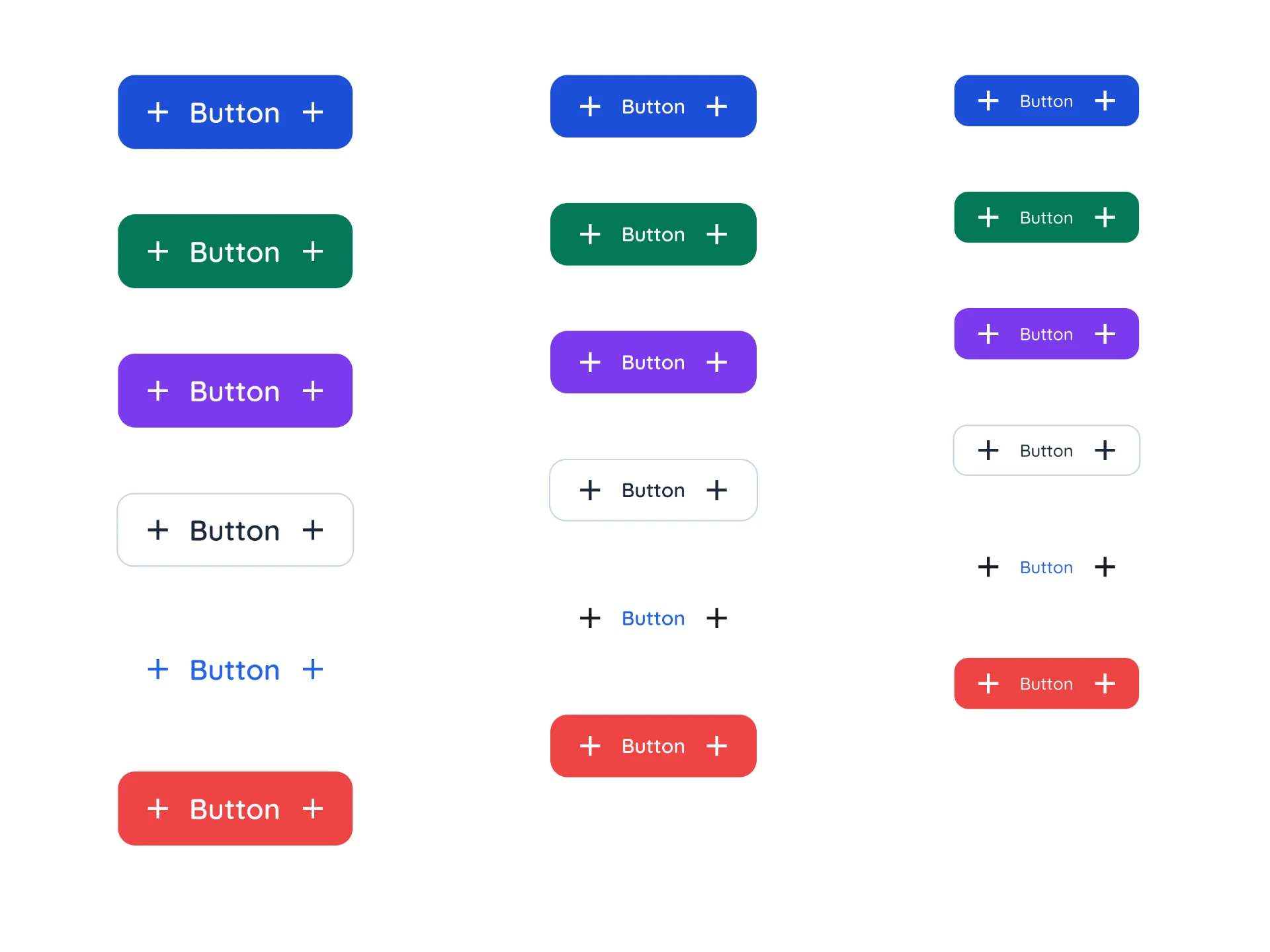
Buttons
04 — Deliver
What did I design, and how would I validate it?
The final product is a system, not a set of screens: how teams form, how work is owned, how collaboration becomes visible, and how feedback returns as growth.
Solution
Seven parts of one system
Team formation
Teachers create balanced teams; students receive the assignment and enter the project.
Project workspace
Overview, Team Chart and My Tasks — navigation contextual to the project.
Team collaboration
Discussion belongs to the current stage, not to a global inbox.
Task management
Each stage contains tasks; each task has one owner.
AI support
Recommendations, nudges and pattern observations — never a grade.
Feedback & growth
Teacher review, AI review, activity, achievements and skill growth.
Achievements
Recognition for constructive behavior rather than academic output.
Team formation
Teams are formed, not chosen
- Teachers create balanced teams.
- Students receive a team assignment.
- Students do not need to approve the team.
- Team members
- Stage roles
- Project overview
- Project journey
Project workspace
Navigation that belongs to the project
Overview, Team Chart and My Tasks. The chat belongs to the current project stage rather than to a global inbox.
Inside a stage
- 01Team discussion
- 02Task allocation
- 03Individual contribution
- 04Review
- 05Summary
- 06Next stage
Inside a task
- 01Task
- 02Mission checklist
- 03Deliverables
- 04Deadline
- 05Upload
- 06Review
- 07Completion
Task system
One task, one owner
- Each stage contains tasks.
- Tasks are assigned to team members.
- Each member can have multiple tasks.
- Students move between their assigned tasks without leaving the project context.
Ownership is what turns a shared deadline into personal accountability.
- Task description
- Deliverables
- Deadline
- Progress
- Submission
- Review
- Feedback
Kinetic Copilot
AI recommends. Humans decide.
- Recommend task allocation
- Nudge participation
- Identify missing information
- Summarise discussions
- Surface patterns
- Support reflection
Feedback & growth
Feedback sits outside the project, on purpose
Keeping review separate from the active workflow lets it read as development rather than grading.
- Teacher review
- AI review
- Activity
- Achievements
- Skill growth
- Project overview
- — Final presentation
- — Team summary
- — Contribution snapshot
- — Structured rubric
Teacher review focuses on the final summary and a structured evaluation. AI provides an evidence check but never changes the teacher's score.
- Participation82
- Communication74
- Leadership68
- Accountability88
- Team support71
- Revision behavior63
Illustrative prototype values. These are observations derived from project activity, not an automated academic grade.
- Participation
- Communication
- Leadership
- Accountability
- Collaboration
- Task completion
- Deadline behavior
- Support for teammates
One question, answered with evidence: what did I actually contribute?
- Messages
- Ideas
- Tasks
- Uploads
- Revisions
- Leadership actions
- Team support
- Deadlines
Achievements
Recognition for how you worked, not what you scored
Gamified but educational — rewarding constructive behaviour without turning the interface into an arcade.
- Stage Leader
- Discussion Starter
- Team Helper
- Reliable Teammate
- Idea Builder
- Feedback Explorer
- Problem Solver
- Growth in Action
Teacher experience
Review a team without reading every message
The system surfaces what a decision needs, and nothing else.
Teacher Dashboard
Projects, teams and anything waiting on a decision.
Team / Project Review
Team summary and stage history in one view.
Assessment + AI Evidence Check
Rubric beside the evidence behind it.
Revision / Final Review
Approve, or return the work with a reason.
- Final output
- Team summary
- Contribution evidence
- Assessment rubric
- Revision history
Product flows
How the experience works
The project journey connects team formation, collaboration, individual work, review and growth into one continuous experience.
01 — Student Flow
From Team Assignment to Task Completion
How a student moves from joining a team to understanding their role, collaborating with teammates, taking ownership of a task, and completing the stage.
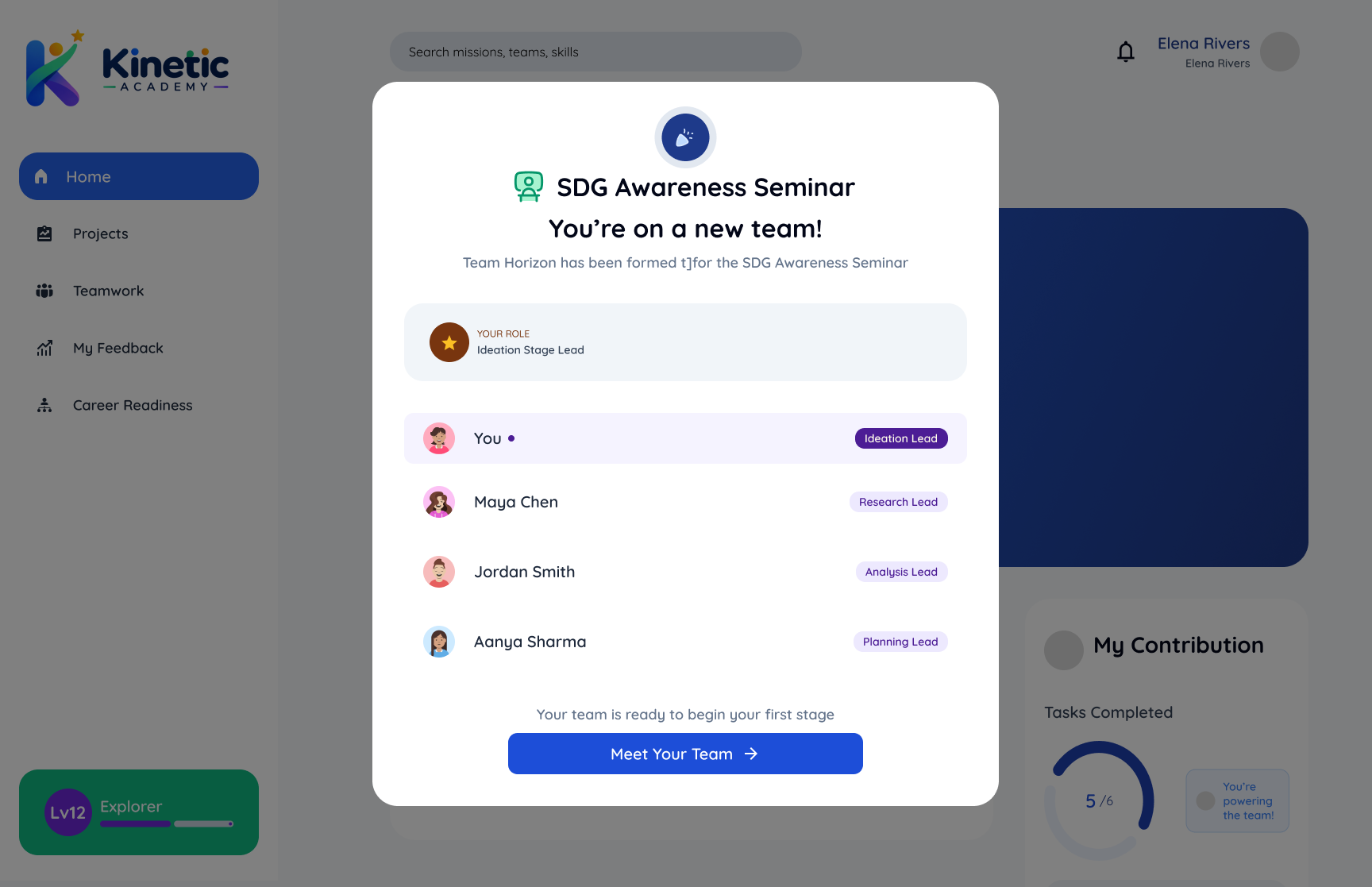
01 You're on a New Team
A notification modal tells the student they've joined Team Horizon for the SDG Awareness Seminar, showing every member, their stage role, and the student's own role.
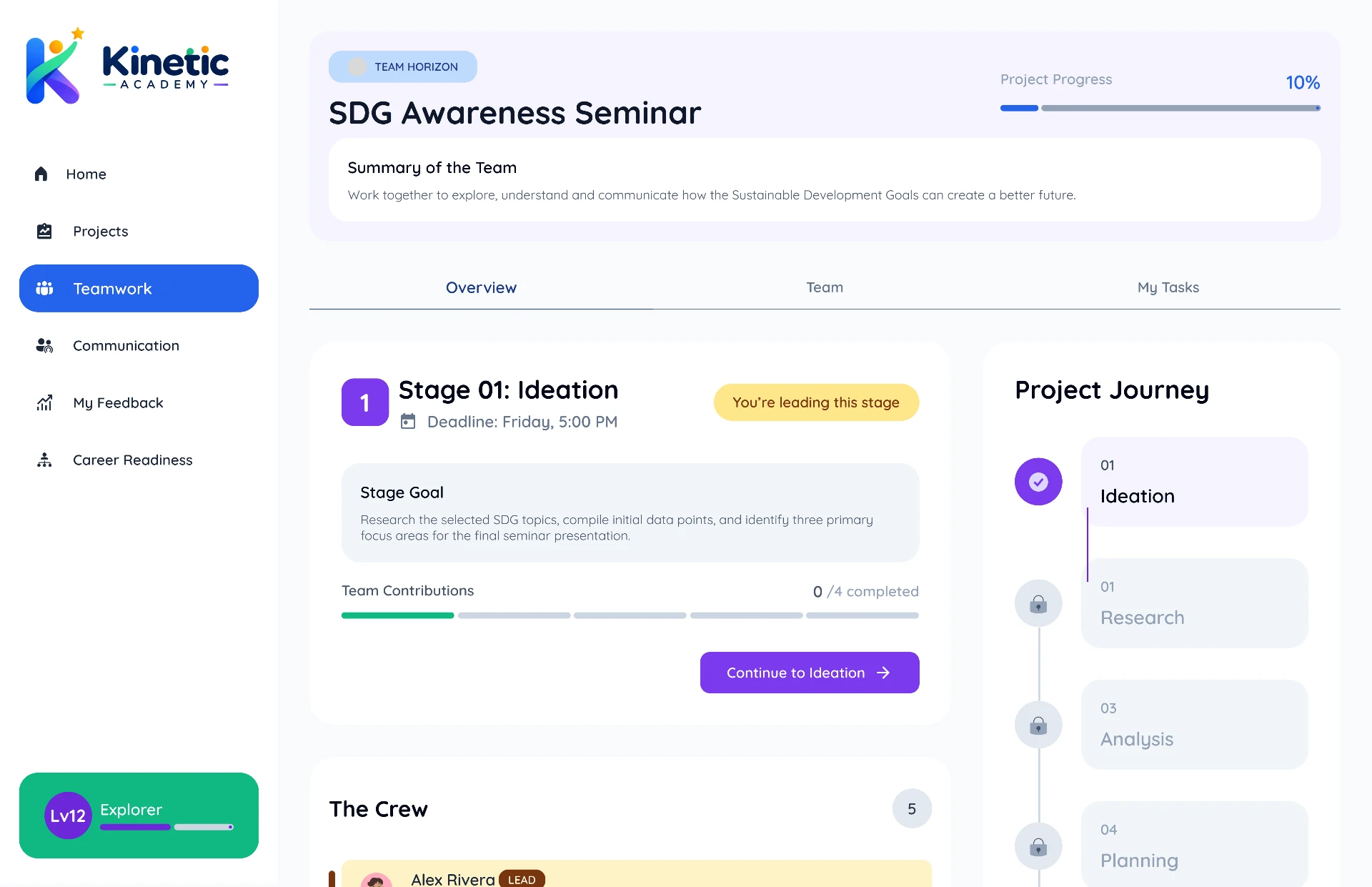
02 Project Overview
The student sees the whole project journey before starting — synopsis, team, stage goal, contribution progress, and the five stages with only Ideation unlocked.
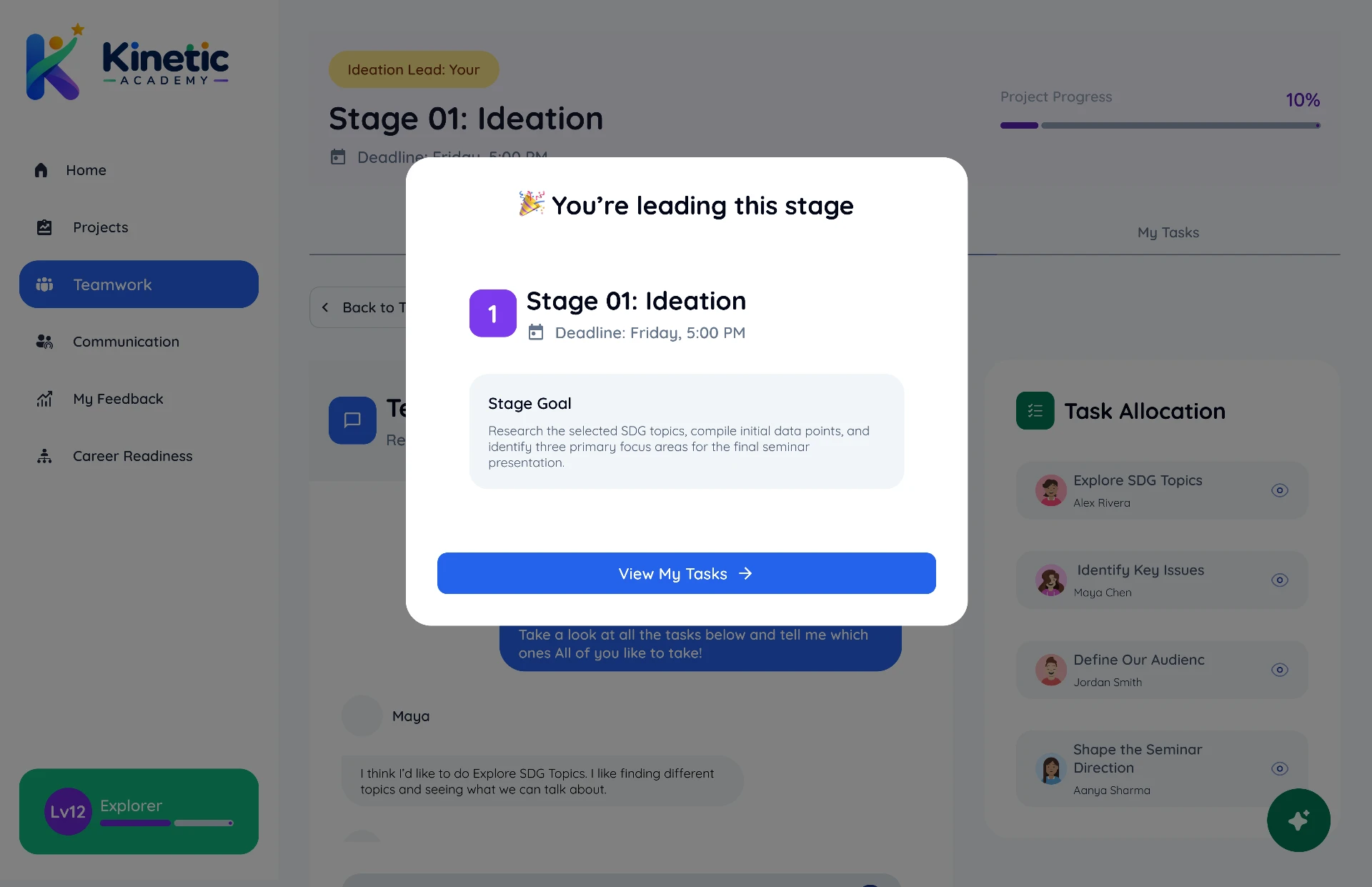
03 You're Leading This Stage
As Ideation Lead, the student is told they'll start the discussion and help allocate tasks. Members who aren't the lead see that their Stage Lead will open the conversation.
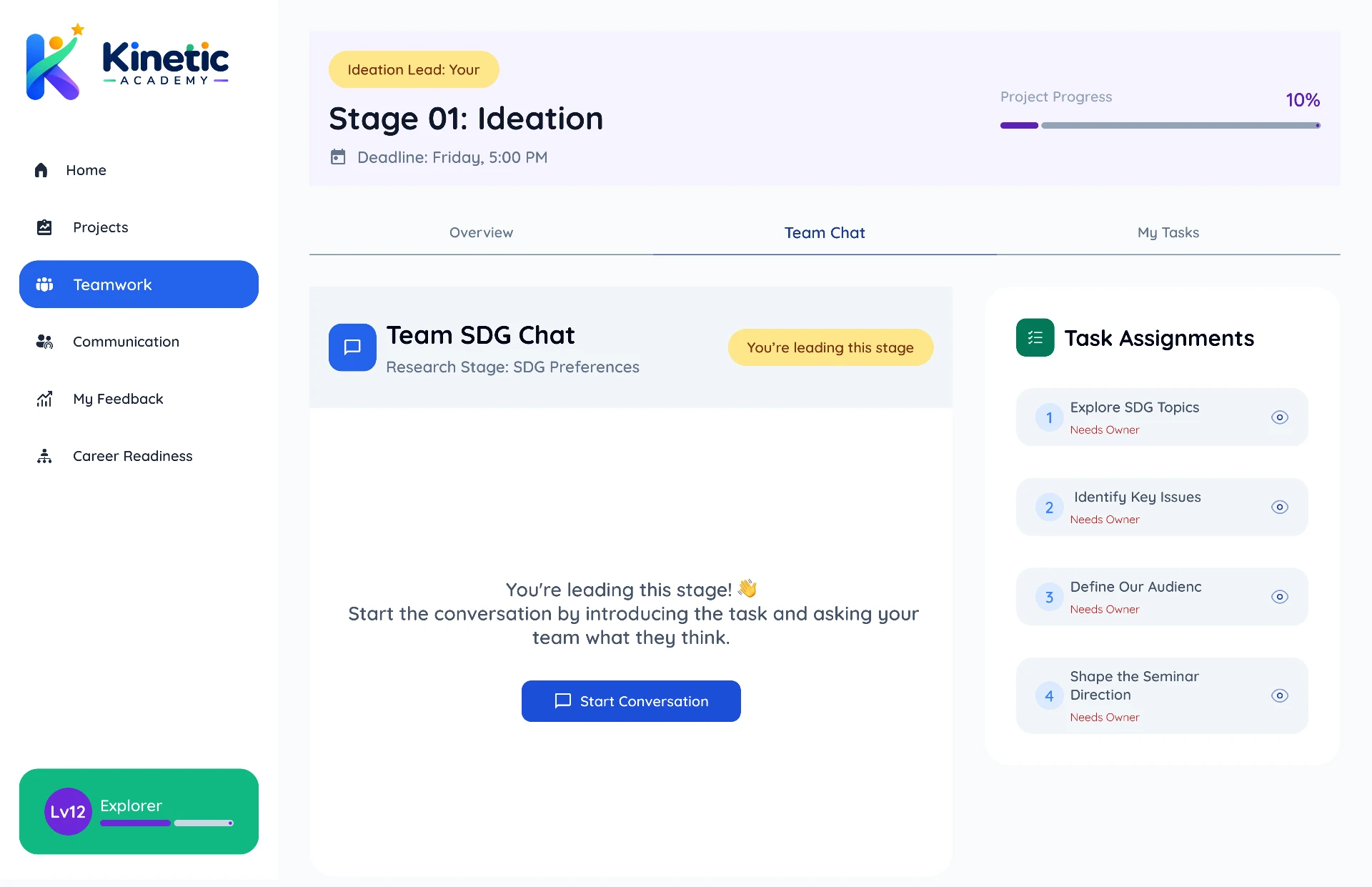
04 Start the Team Discussion
The lead opens the stage conversation before any task is allocated. Everyone else's input stays disabled until that first message lands.
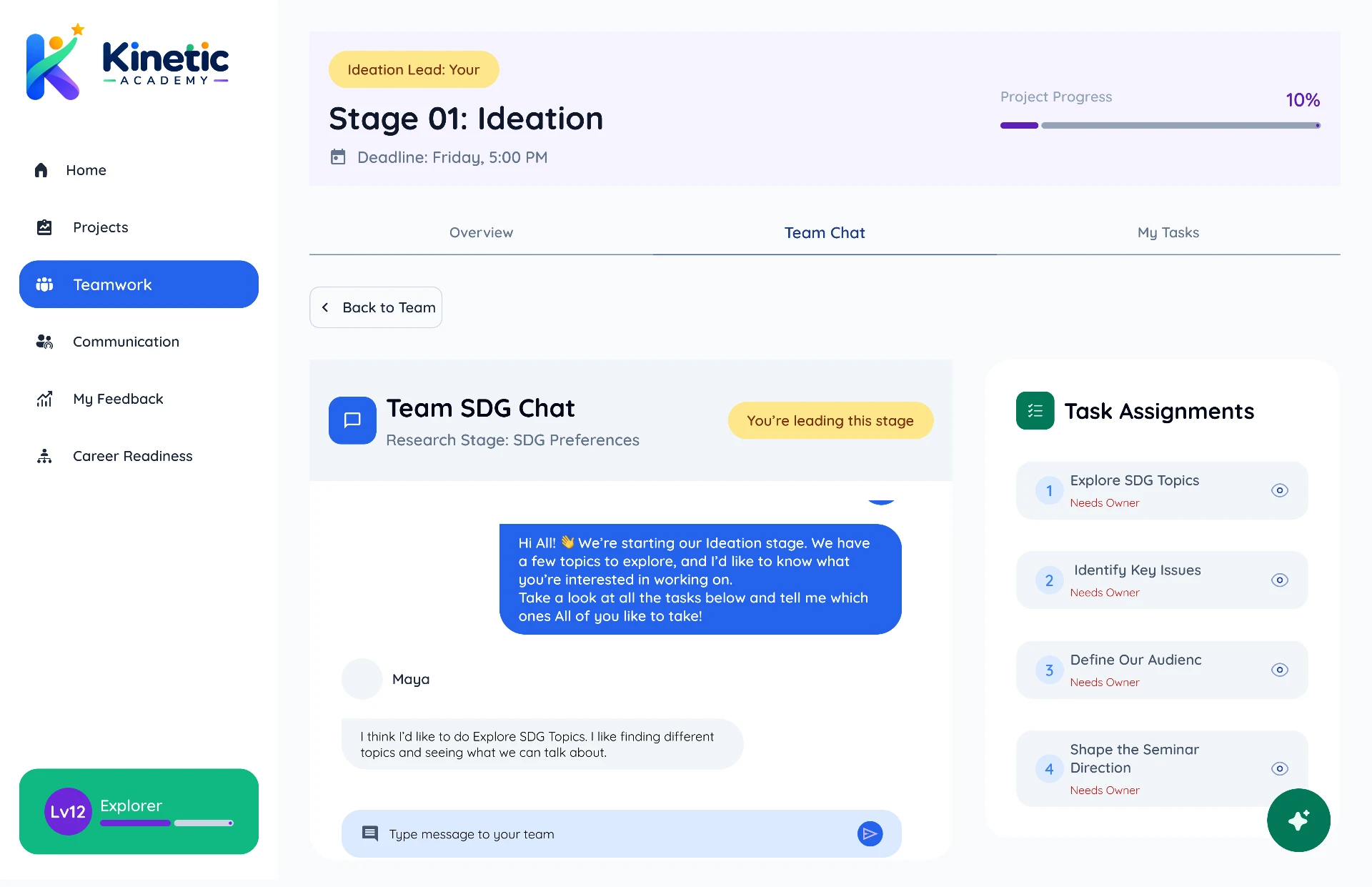
05 Discuss & Choose Tasks
Teammates say which task they want and why. Kinetic Copilot can suggest a balanced distribution, but the lead decides.
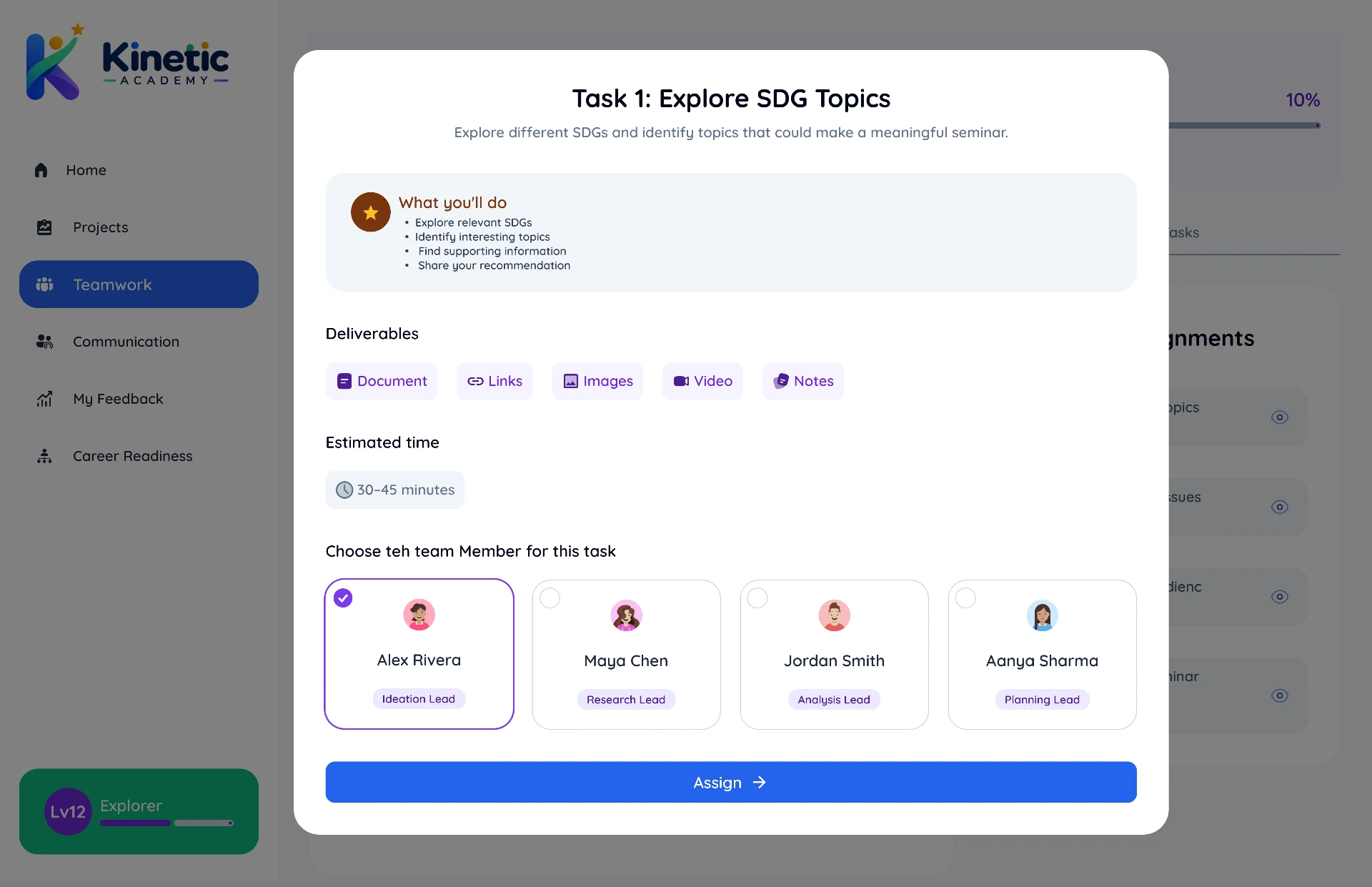
06 Assign Stage Tasks
The lead assigns each task to a member with a title, short brief and deadline. If someone doesn't respond in time, Copilot offers a clearly labelled recommendation.
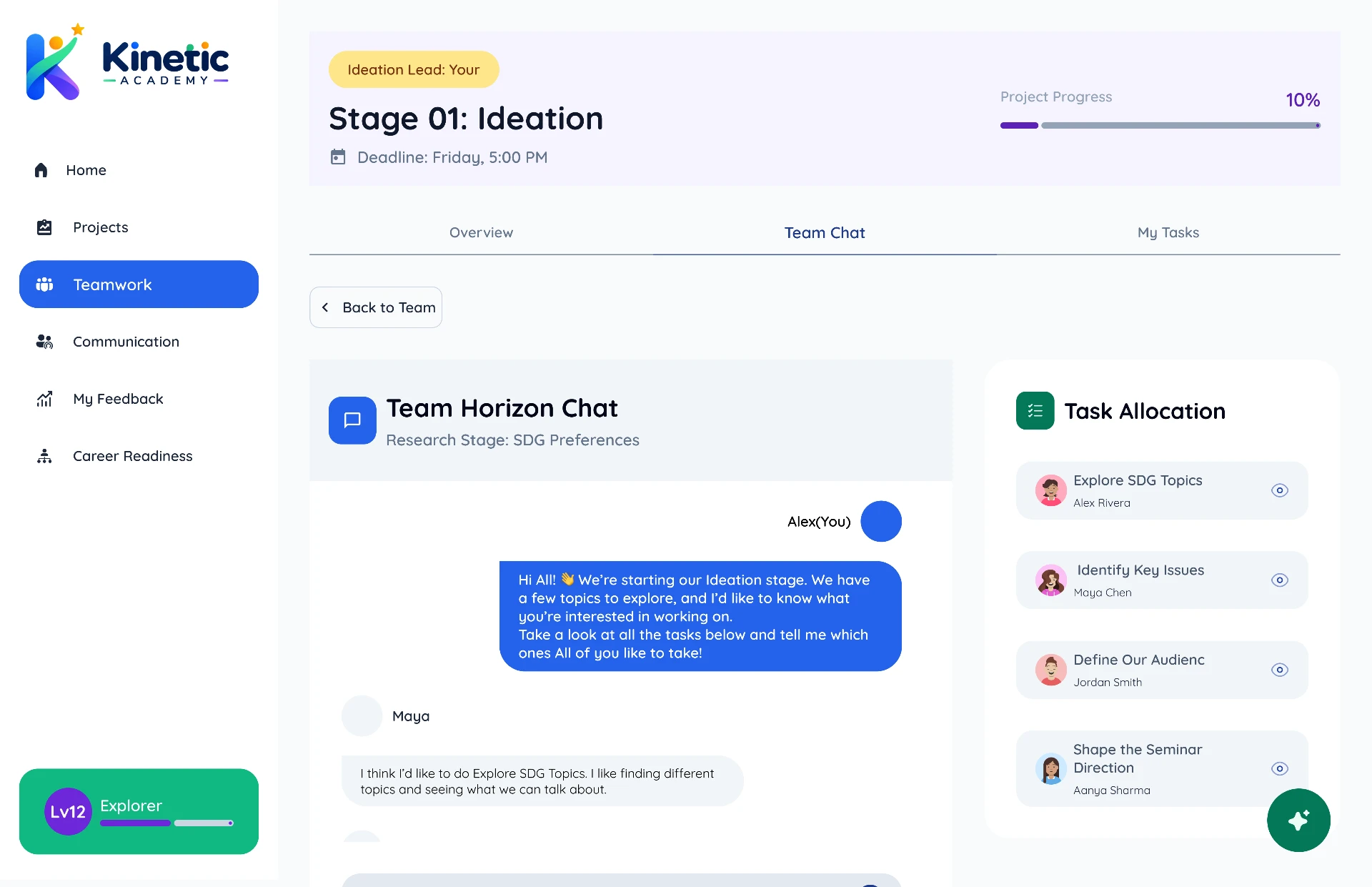
07 Tasks Are Assigned
The confirmed allocation is posted back into the discussion with deadlines, so the whole team shares one source of truth.
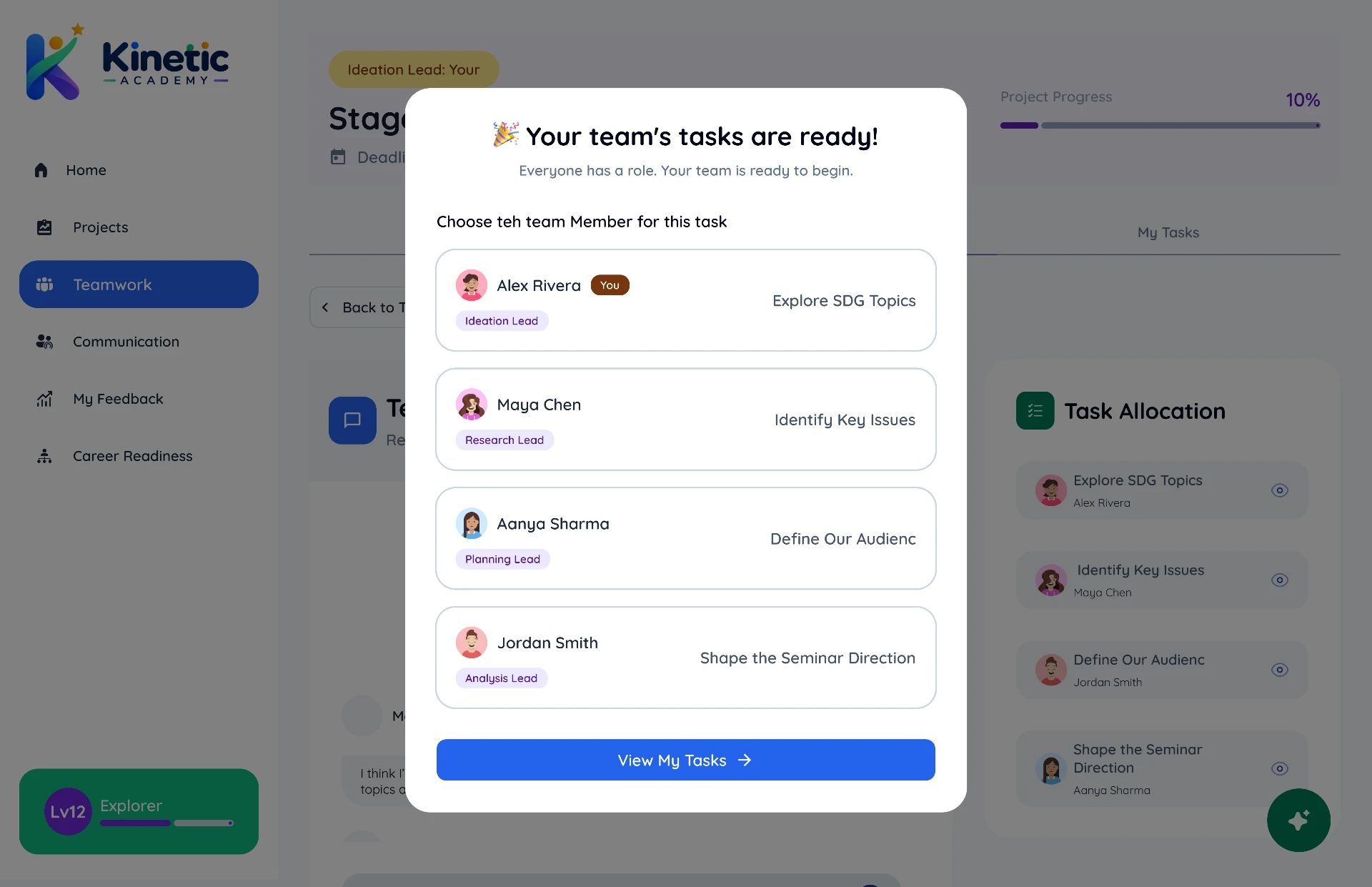
08 Your Team's Tasks Are Ready
A confirmation modal summarises who owns what before anyone starts working.
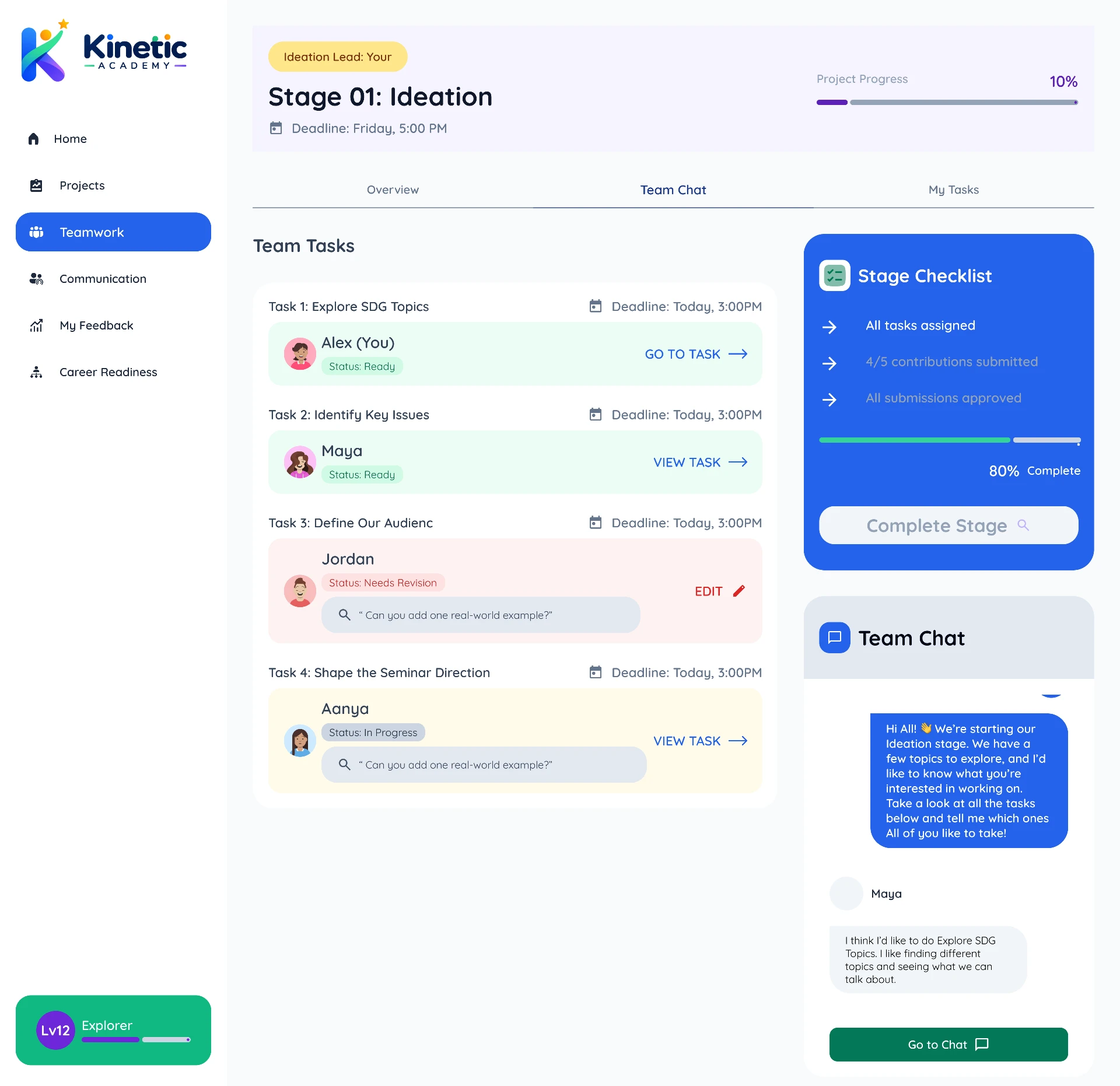
09 Stage 01 — Ideation
The stage workspace: Overview, Team Chart and My Tasks in one place, with task status, stage checklist and progress. The next stage stays locked.
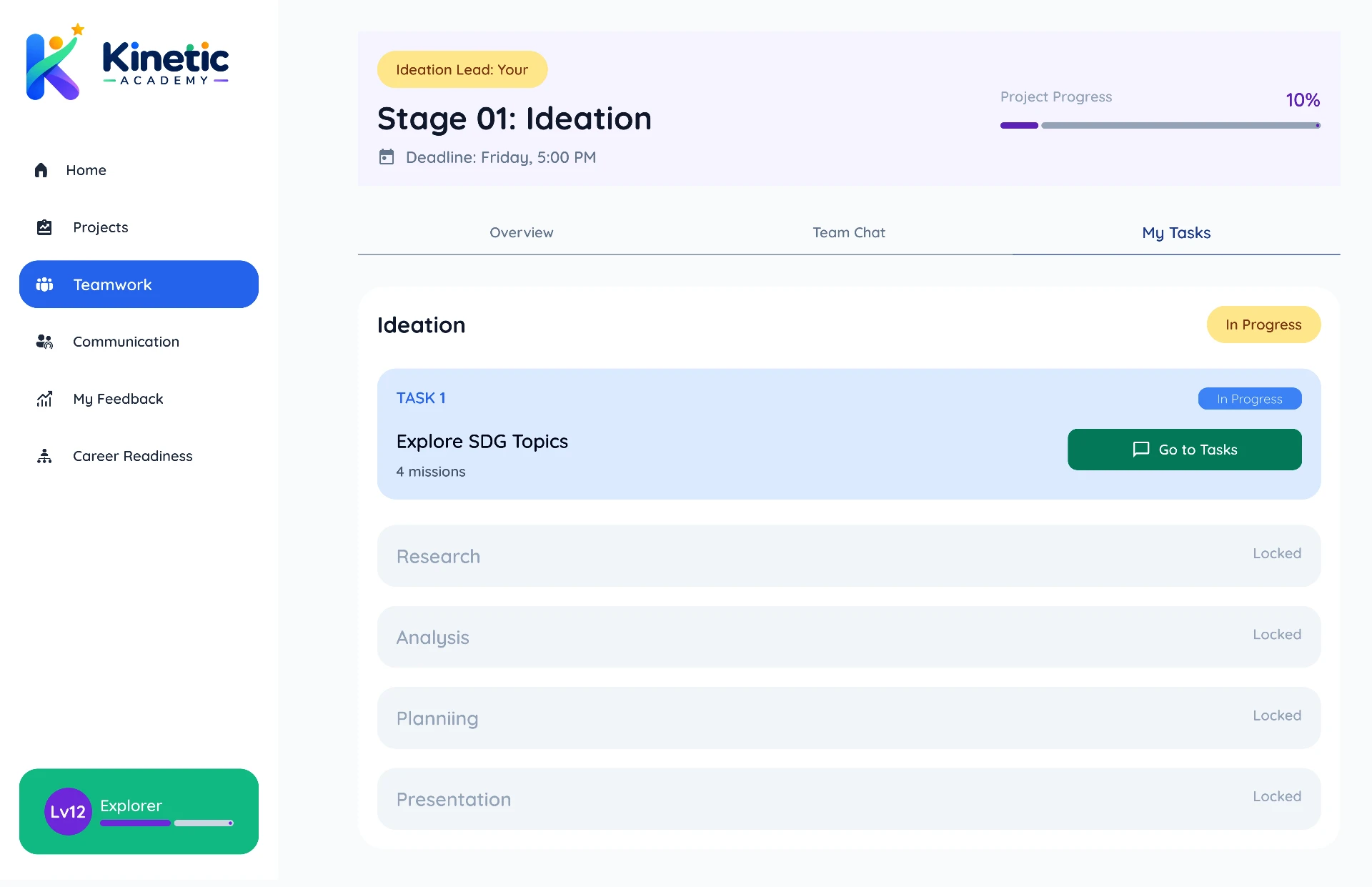
10 My Tasks
Only the student's own tasks for this stage, with status, deadline and progress — and a switcher for moving between multiple tasks.
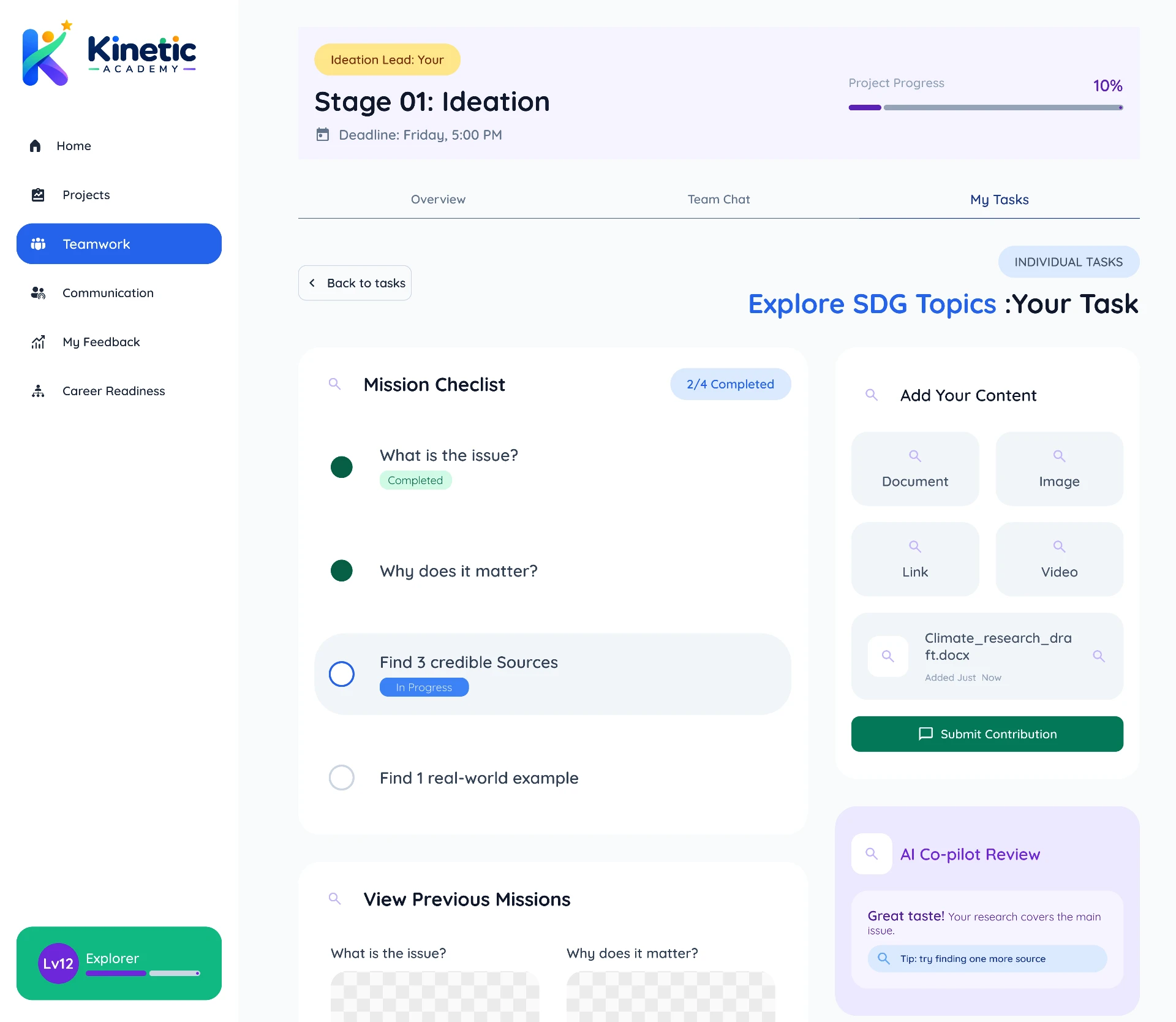
11 Your Task: Climate Action
One task, opened: description, deadline, mission checklist, upload area for evidence, and Copilot support alongside.
02 — Student Flow
From Project Completion to Personal Growth
How students understand what they accomplished, how they collaborated, and where they can improve. Feedback lives outside the project workspace — it appears only after the teacher's review.
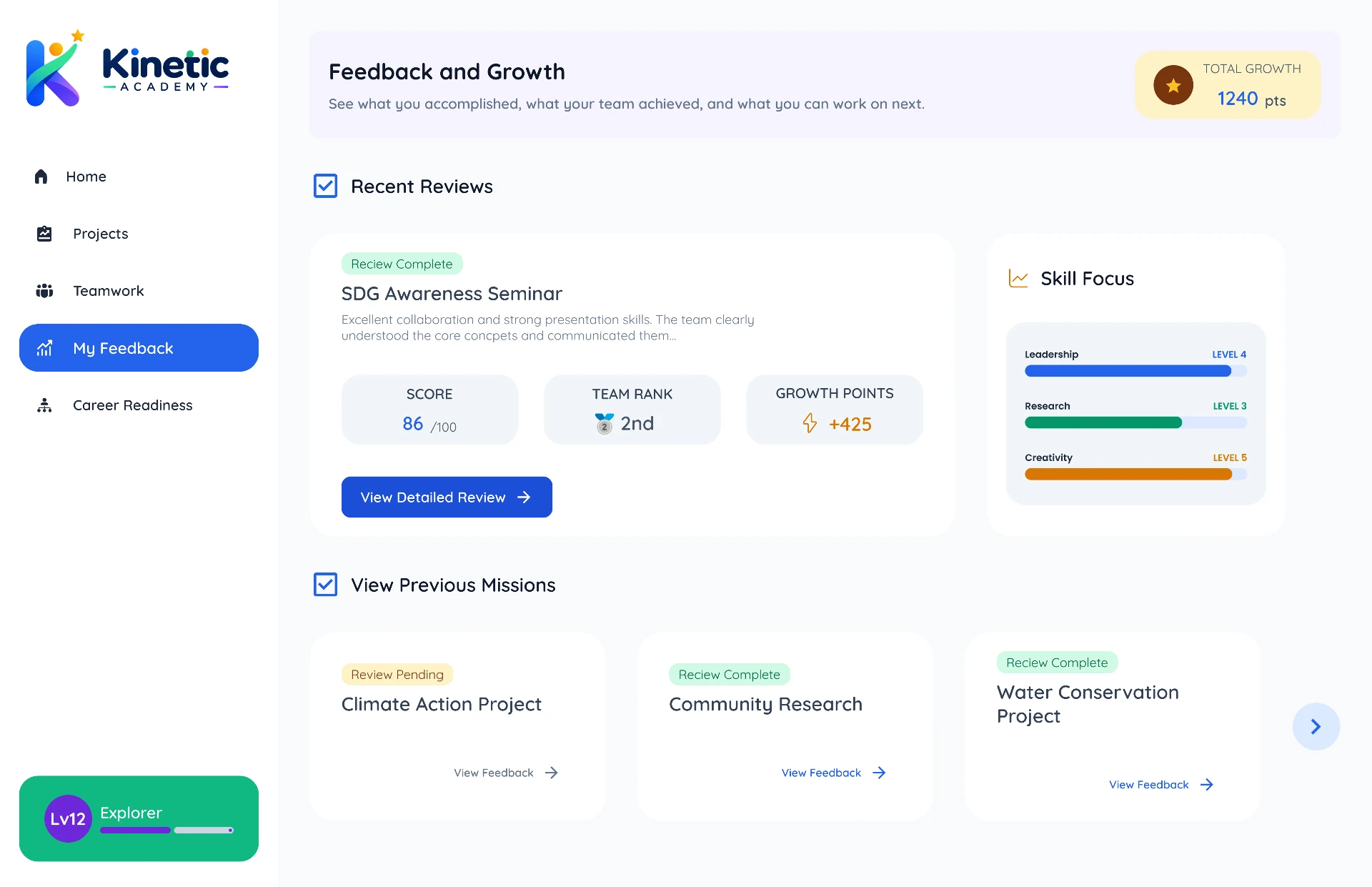
01 Your Project Review Is Ready
Once the teacher completes their review, the student is notified inside Feedback & Growth.
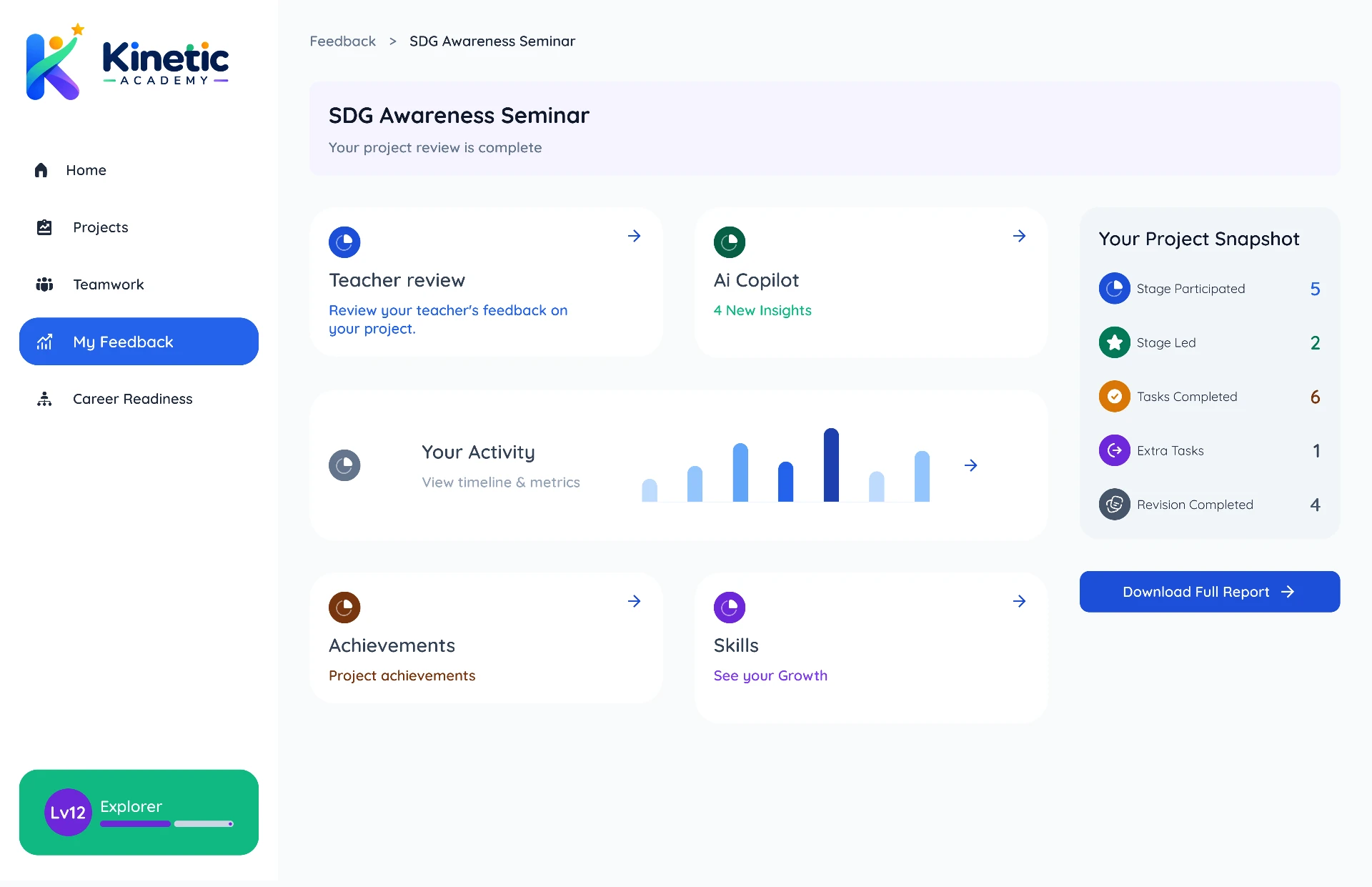
02 Your Project Review
A high-level view: project achievement, teacher review, AI review, skills developed, achievements earned and activity recorded.
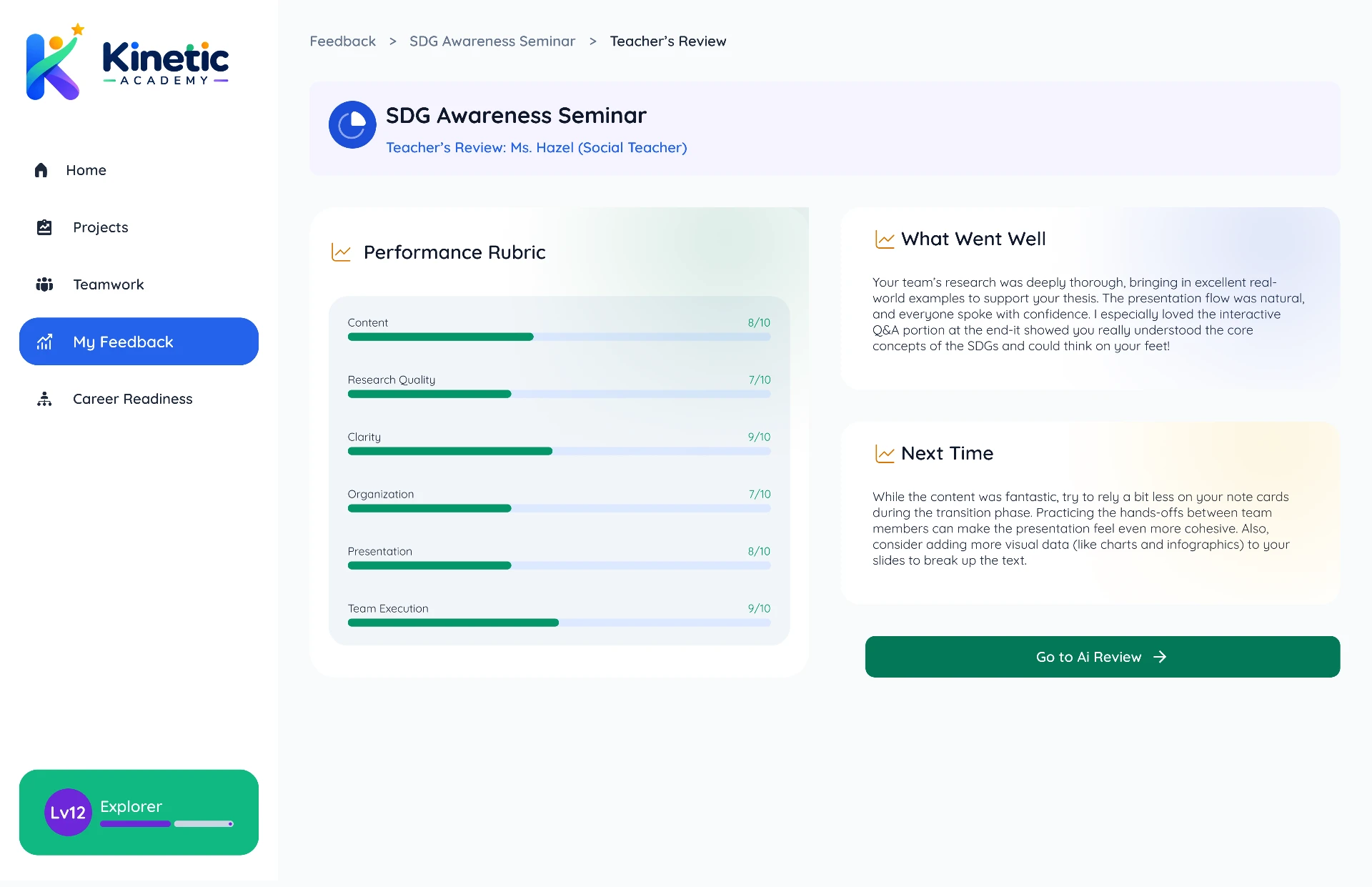
03 Teacher's Review
Structured scoring across communication, content, clarity, collaboration and presentation, plus what went well and what to try next time.
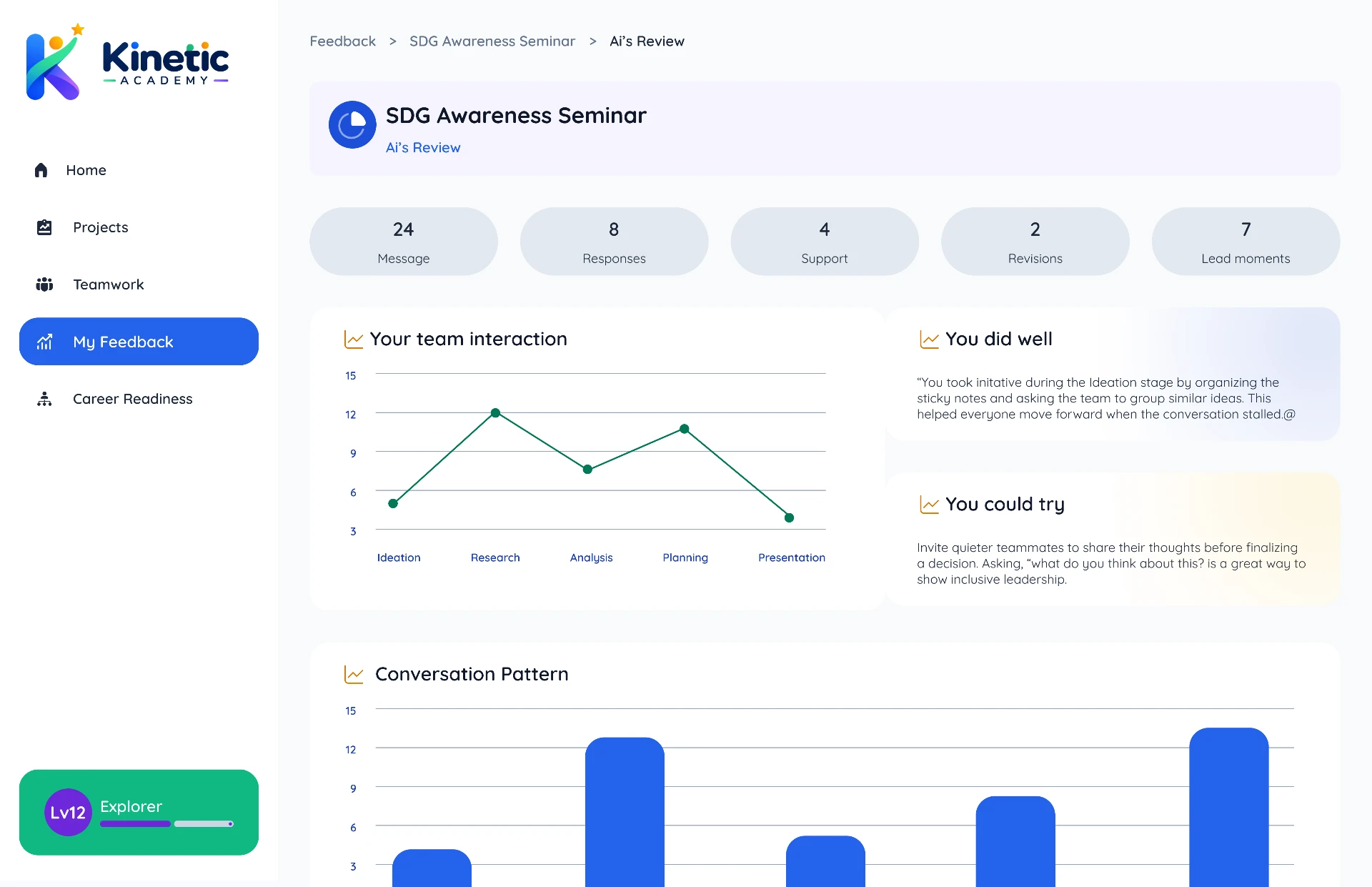
04 Kinetic Copilot Review
Not a second grade — observable behaviour: participation, communication, leadership, accountability and deadline consistency, visualised across the project.
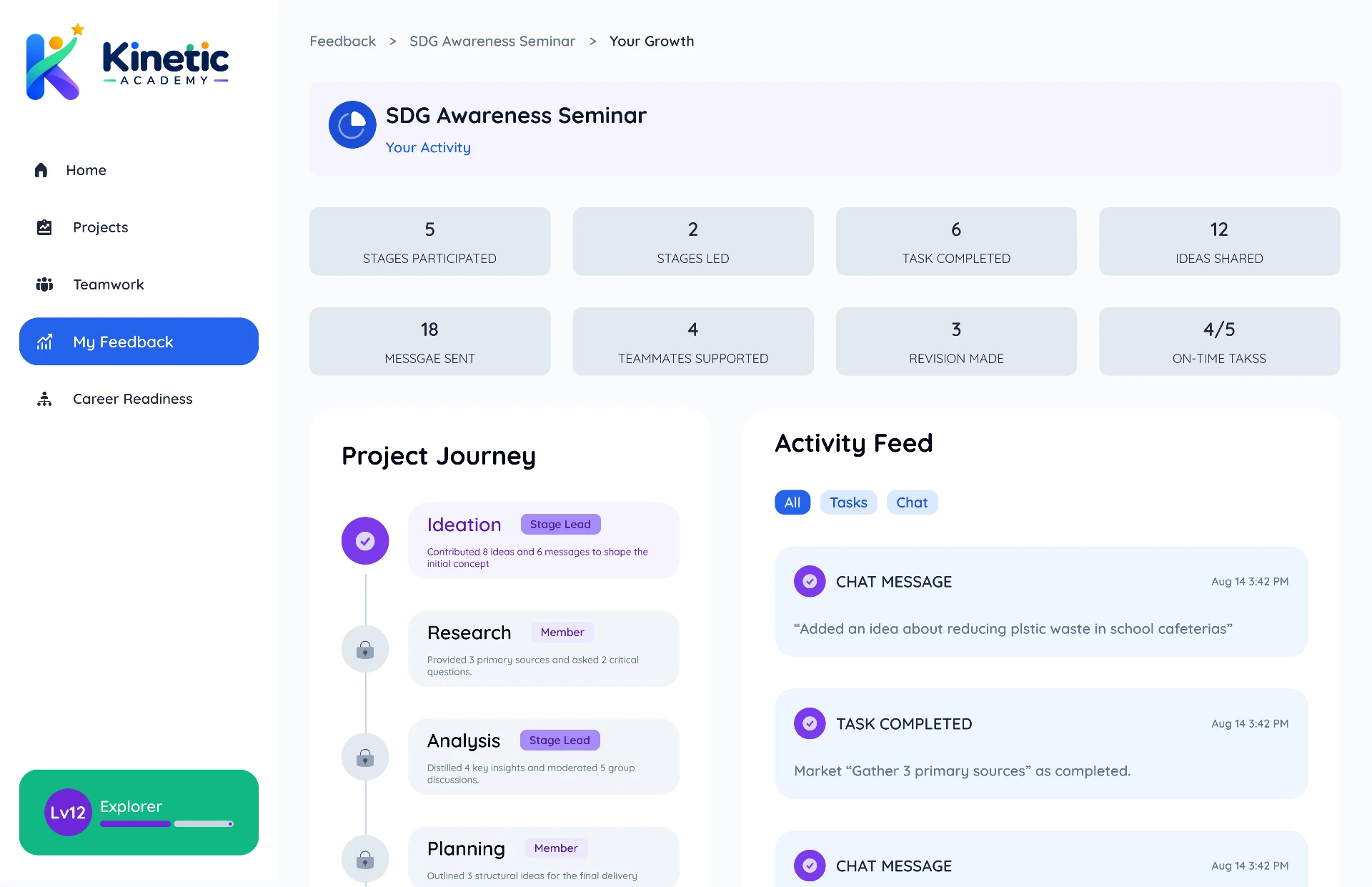
05 Your Activity
A filterable timeline of contributions — messages, tasks, leadership moments and submissions — each tied to the stage it happened in.
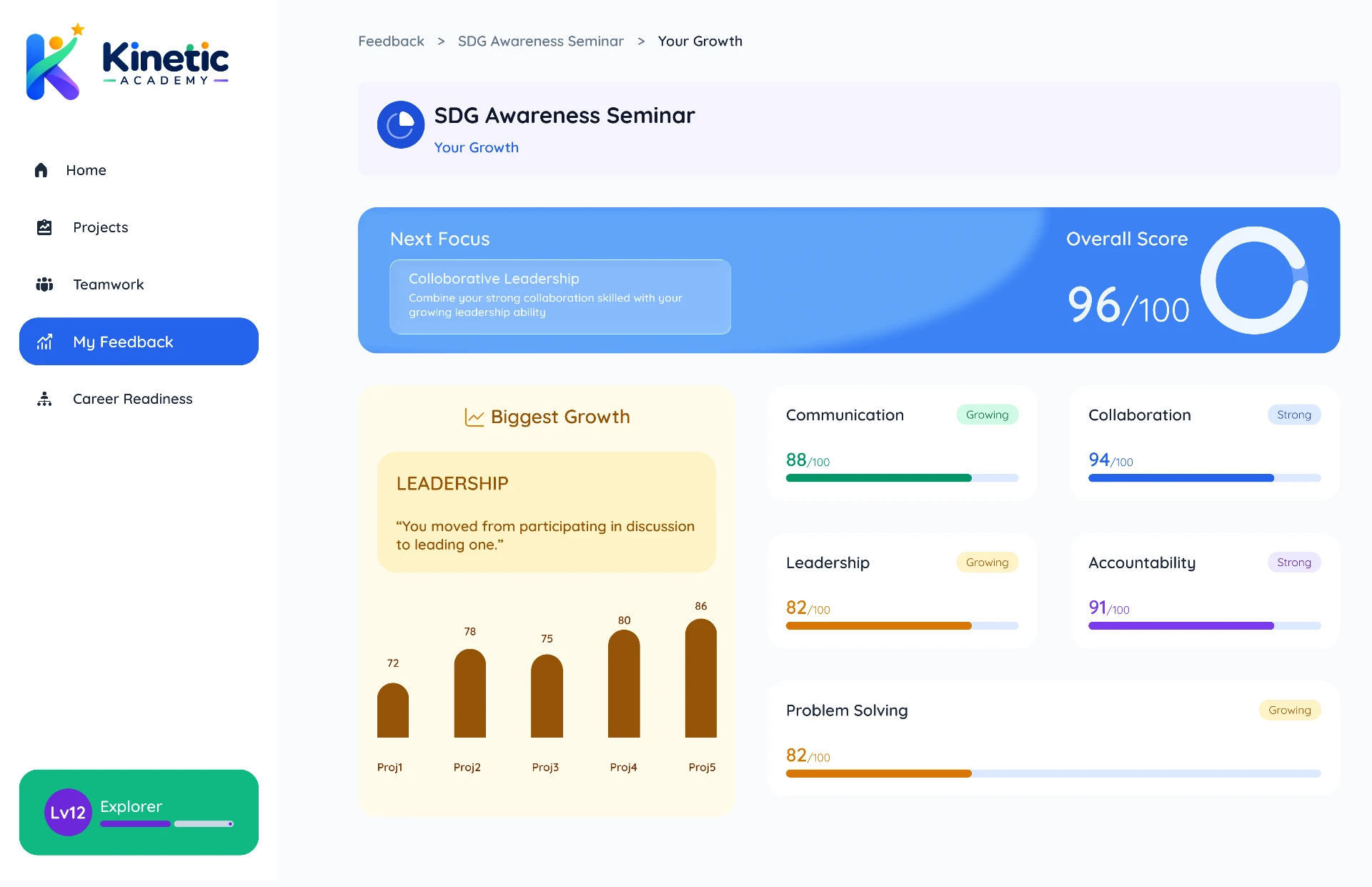
06 Your Growth
Communication, collaboration, leadership, accountability, problem solving and research as learning indicators drawn from project activity — not clinical assessments.
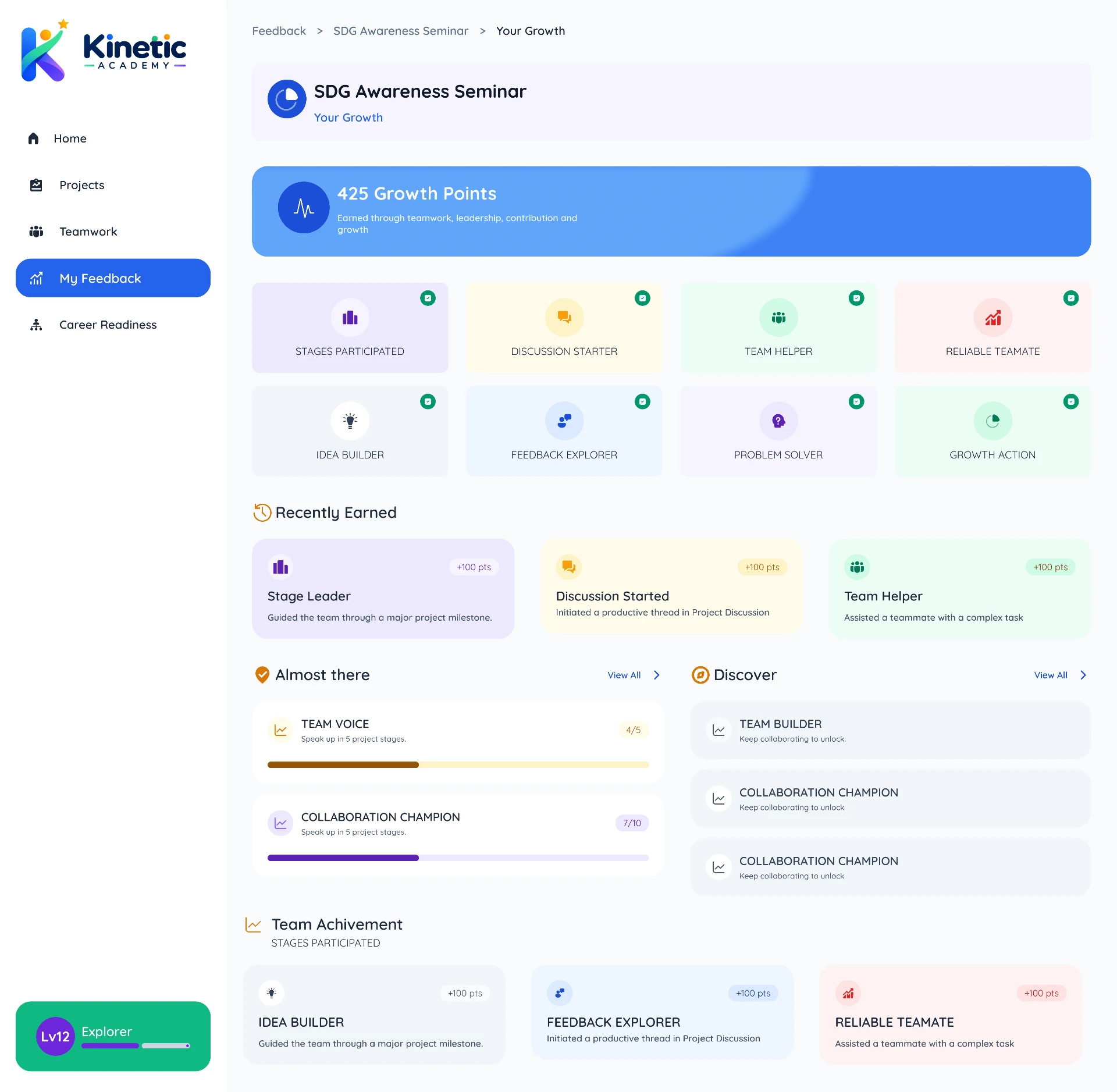
07 Your Achievements
Achievement cards that each explain why they were earned — gamified enough to motivate, restrained enough to stay educational.
03 — Teacher Flow
From Project Submission to Fair Assessment
How teachers review the team's final work while using project evidence to make the assessment more consistent and fair — without reading every message.
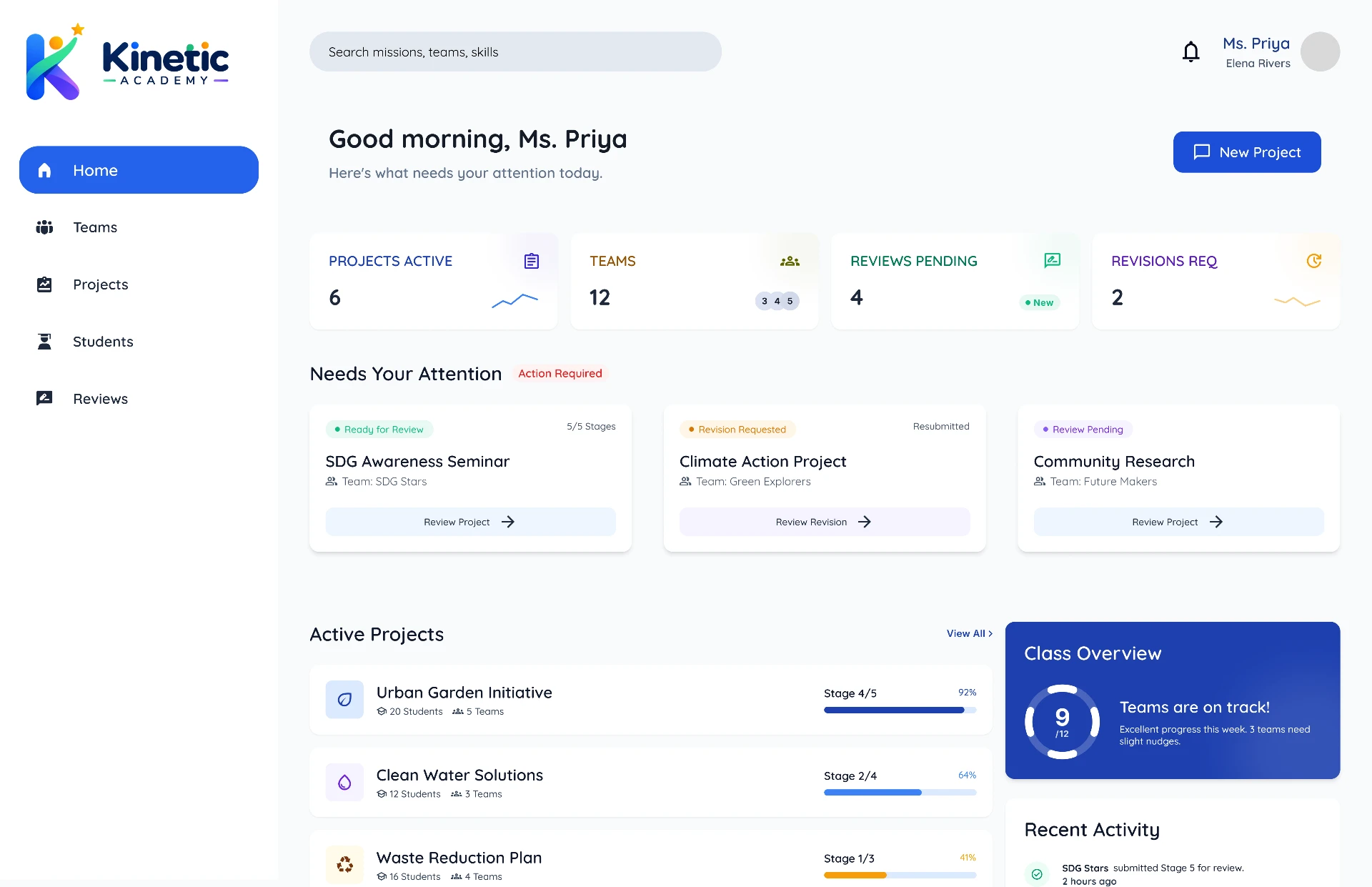
01 Teacher Dashboard
Active projects, teams, projects awaiting review, completed reviews, revision requests and recent submissions — scannable at a glance.
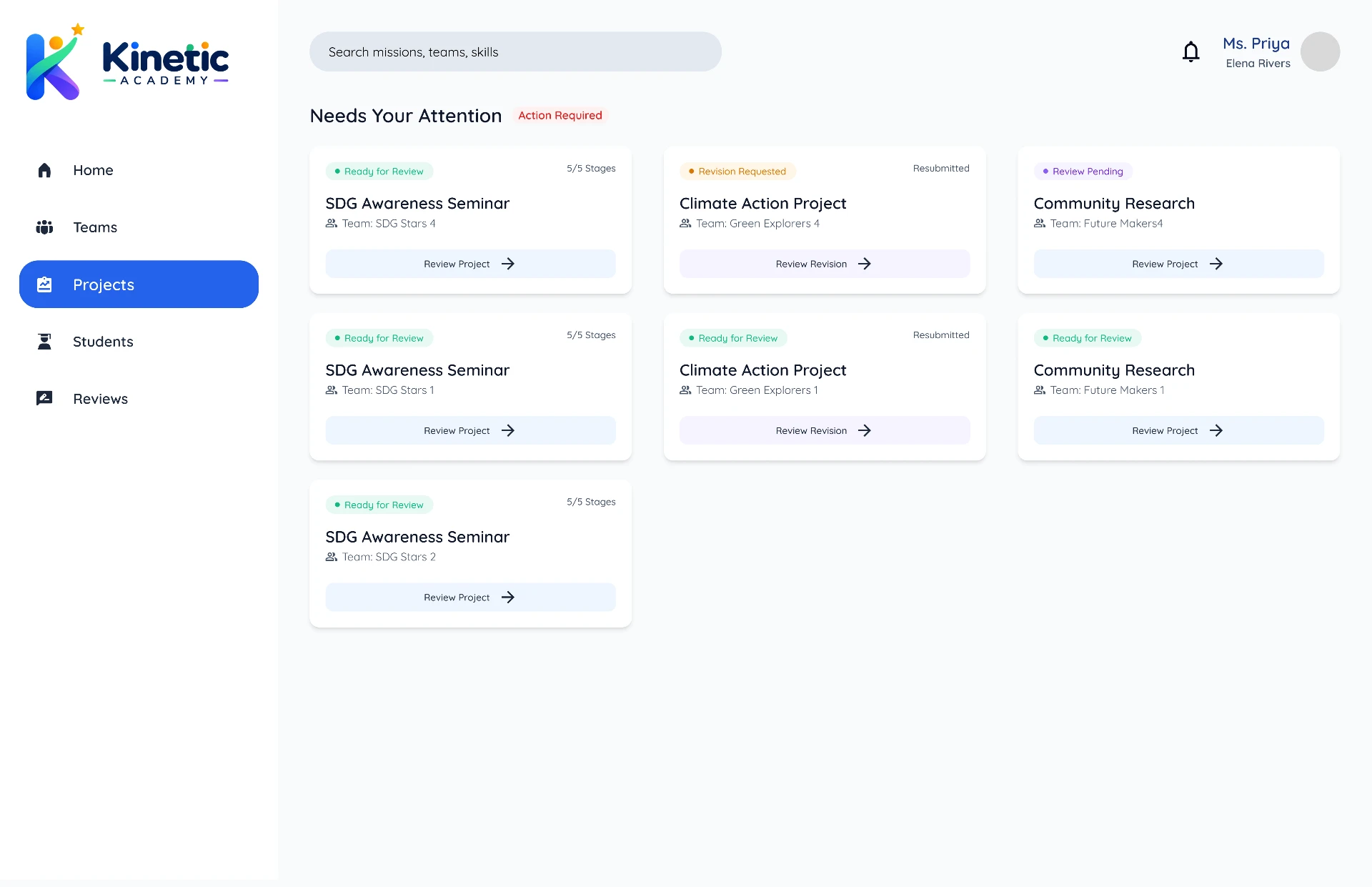
02 Projects to Review
Project, class, team, submission status, review status and deadline in one list, each row opening straight into review.
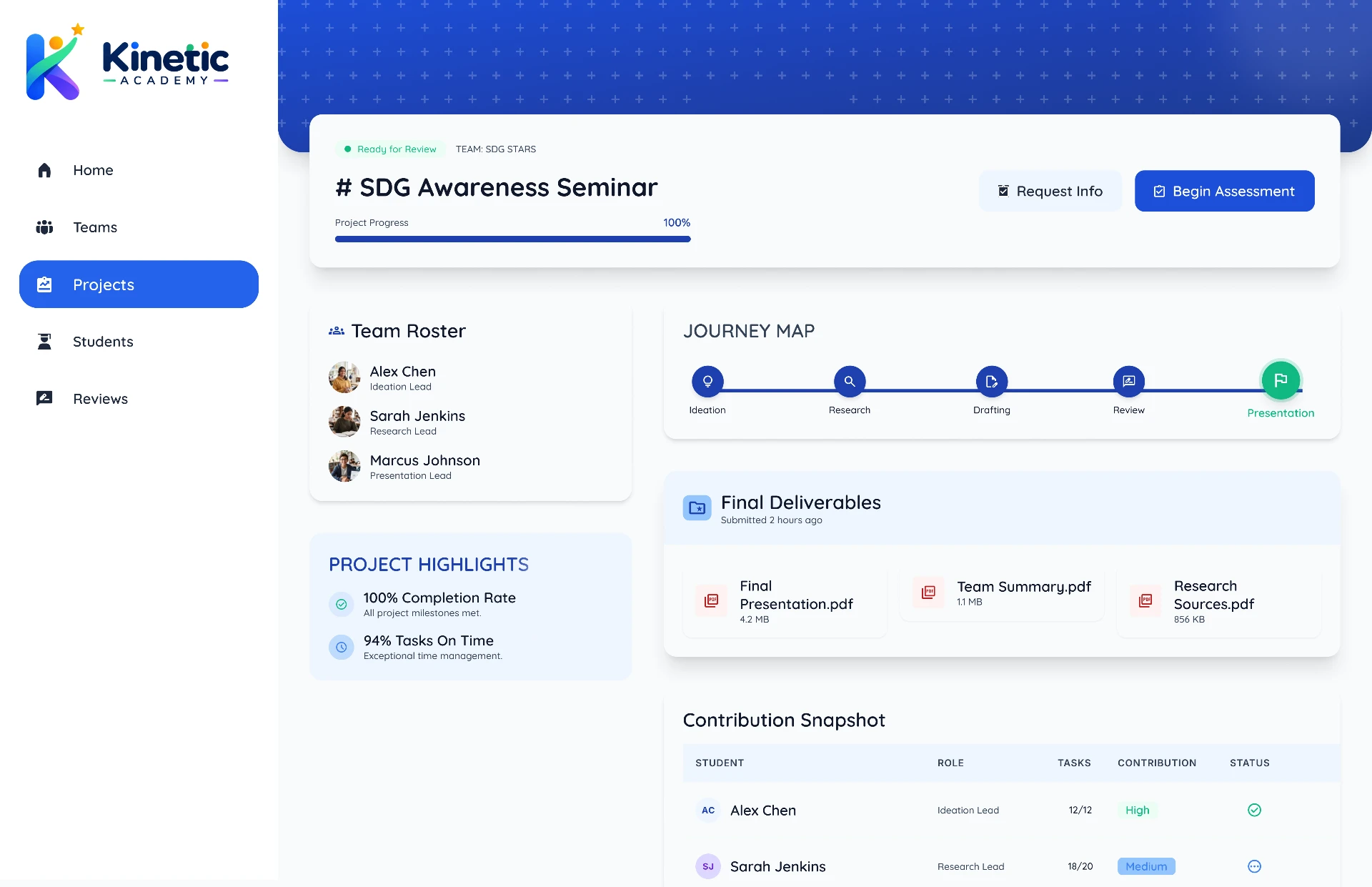
03 SDG Awareness Seminar
The project journey, final deliverables, team roster and contribution overview — summarised evidence, not raw private chat.
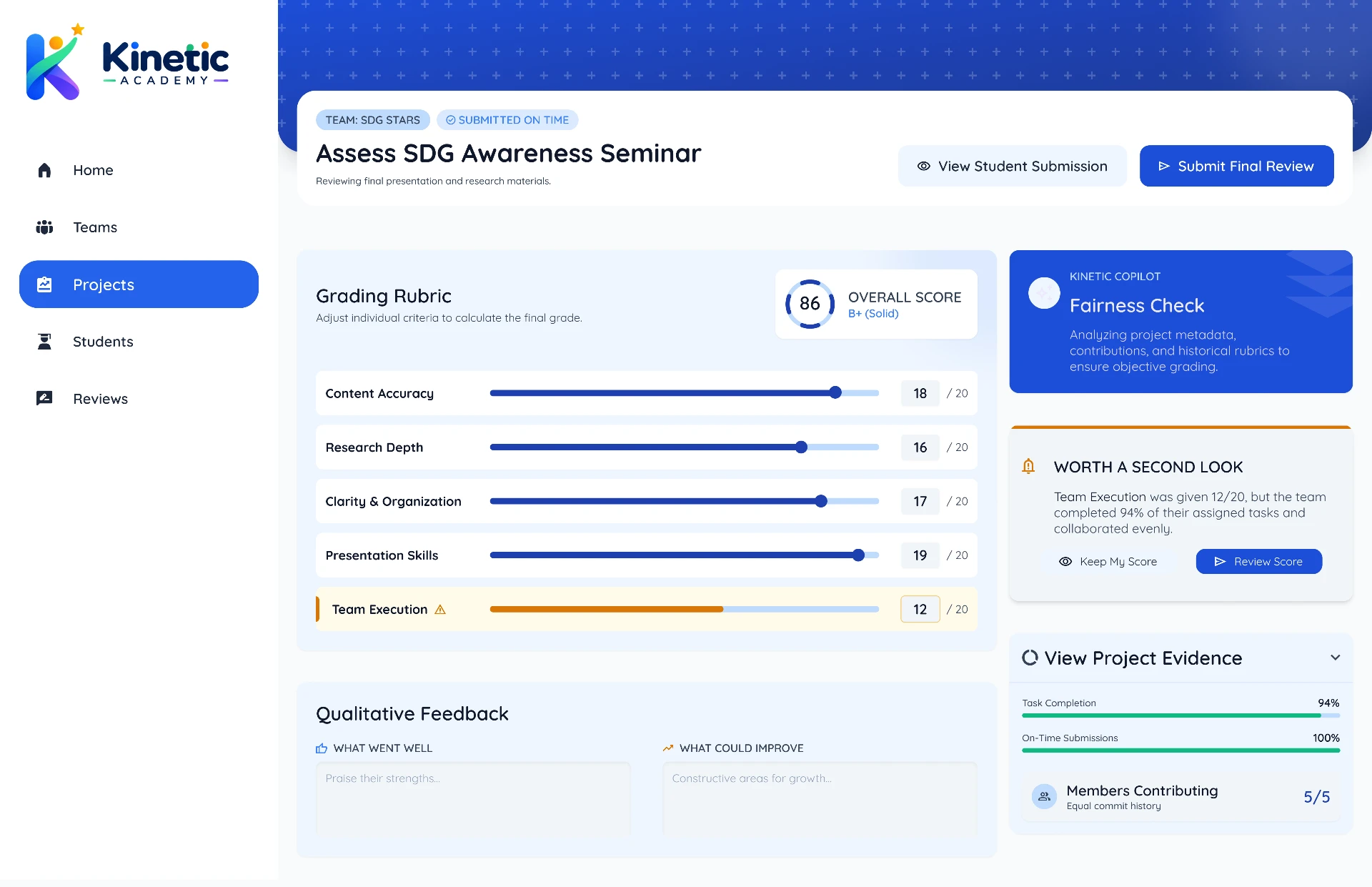
04 Assess the Project
Structured criteria with adjustable score controls: content, clarity, research, communication, presentation and collaboration.
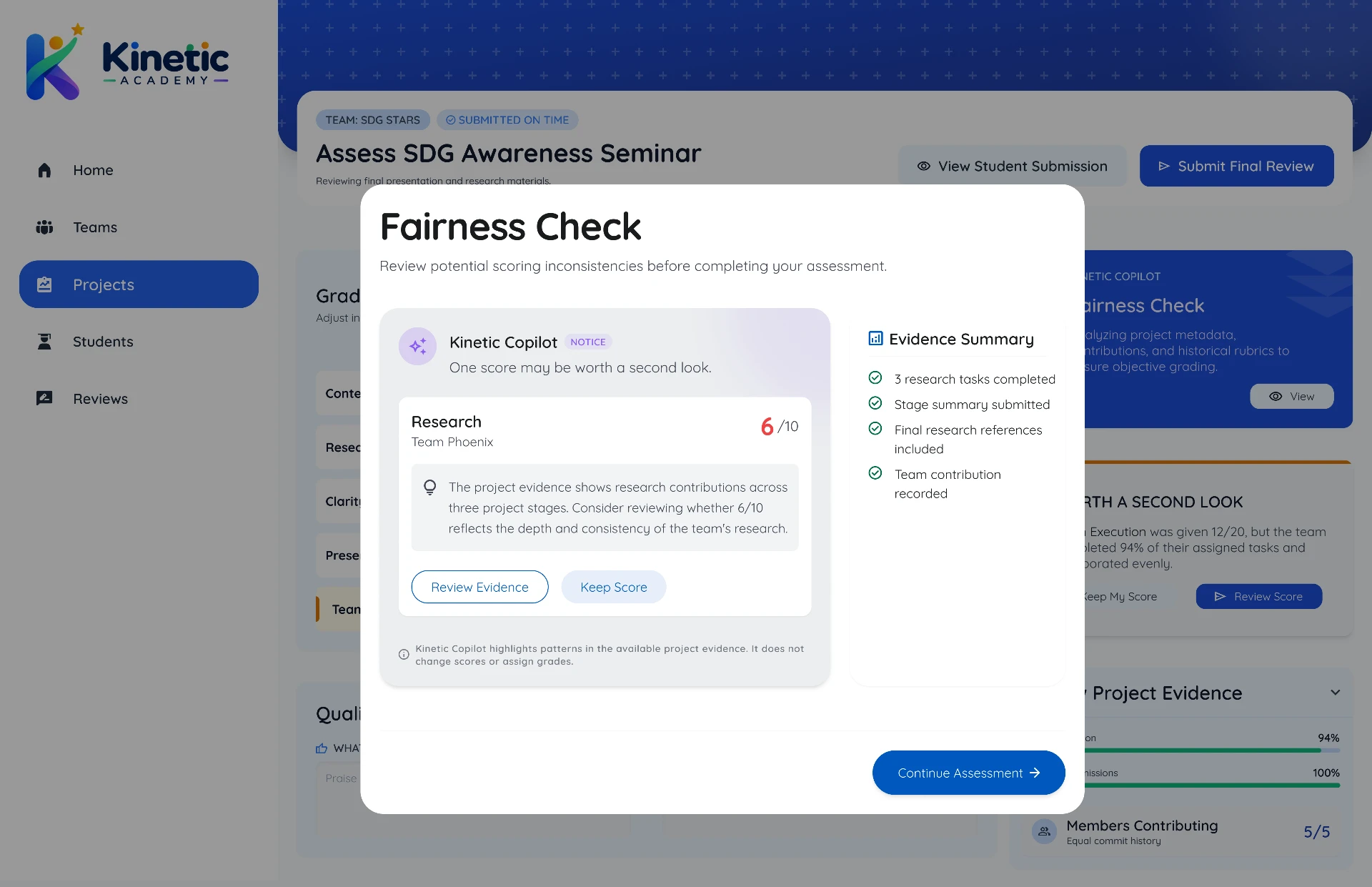
05 Fairness Check
Copilot flags a score that looks inconsistent with project evidence and asks the teacher to reconsider. It never changes the score or assigns the grade.
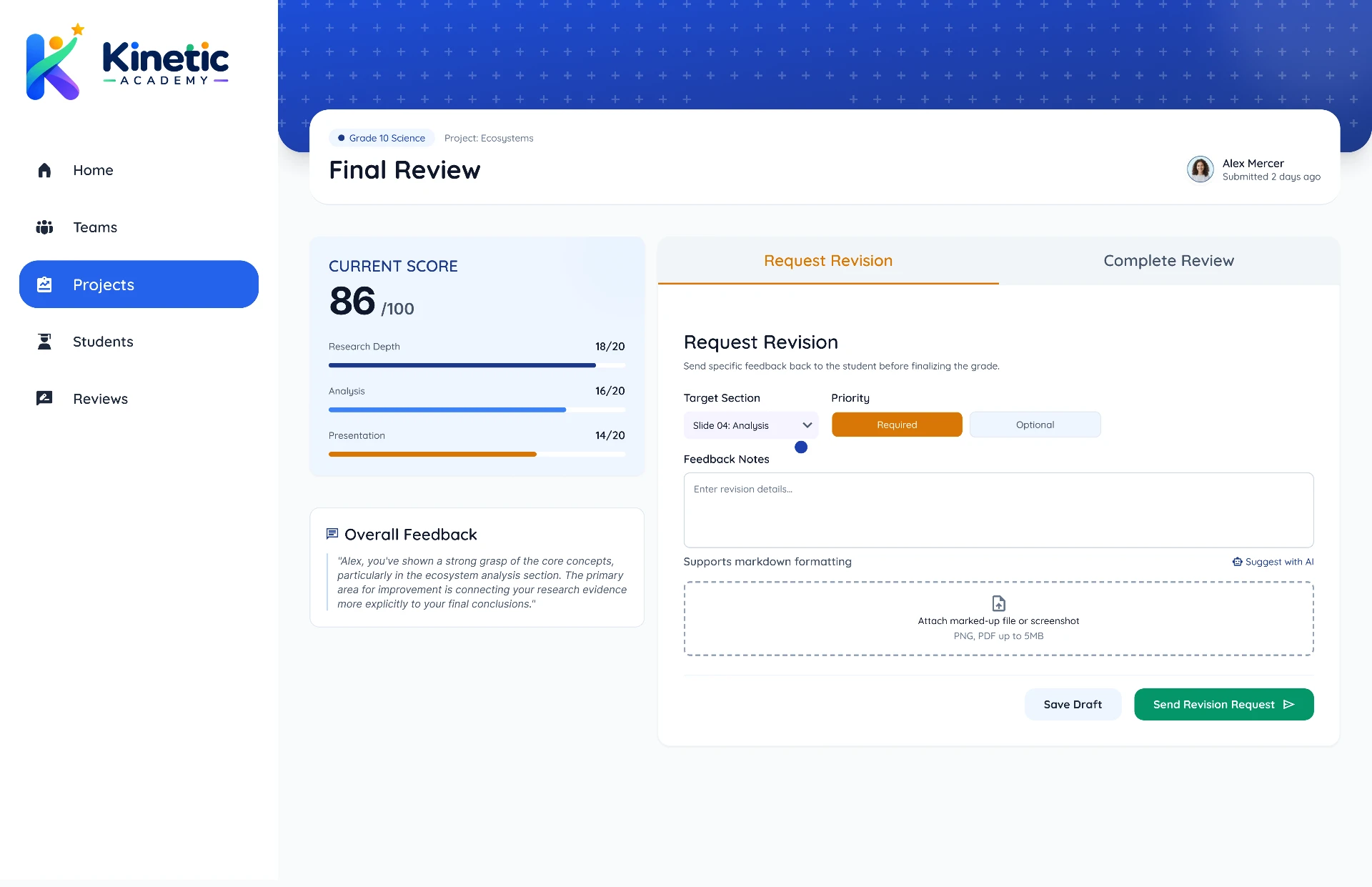
06 Request Revision
Reason, what needs to change and an optional deadline. The project stays incomplete until the revision is addressed.
Together, these flows connect the student experience with the teacher's assessment process — making contribution visible without turning collaboration into surveillance.
Evidence & success
What the evidence covers, and what comes next
Desk research, PESTEL, exploratory interviews and the affinity synthesis shaped this concept. The outcome measures below are the ones I would put in place to judge whether it works.
Balanced participation
Measure whether contribution becomes more evenly distributed across team members.
Teacher effort
Measure whether structured workflows reduce the manual effort required to form, monitor and assess teams.
On-time task completion
Measure whether clear ownership, deadlines and stage progression improve completion.
Leadership development
Measure whether repeated opportunities to lead increase students' confidence and willingness to take leadership roles.
Exploratory interviews identified the problems and behaviours that shaped the concept. A classroom pilot is the natural next step — measuring whether visible contribution actually improves these outcomes.
Validation
How I would test it
The plan I would run next, in order.
Maze testing
Unmoderated task-based testing of the student flow.
Heuristic evaluation
Structured review against usability heuristics.
Accessibility audit
WCAG contrast, language level and navigation review.
Iteration
Revise the flow and screens based on the findings above.
Reflection
What I learned, and what I would validate next
Designing the mechanism changed how I think about assessment: making a process visible is a structural decision, not a reporting feature.
Student usability testing
Can an 8–12-year-old understand what they need to do without teacher assistance?
Teacher workflow testing
Can teachers review a team without inspecting every interaction?
AI trust
Do teachers understand and trust AI evidence without treating it as the final judgment?
Collaboration outcomes
Does structured team formation actually improve participation?
Leadership outcomes
Does rotating leadership create meaningful leadership practice?
Accessibility
Can students with different cognitive and accessibility needs use the system comfortably?